Advanced Payment Technology
Included free with DTMF Suppression or Channel Separation

Advanced Payment Links

Stop chasing payments. Send a secure link via email or SMS, and let customers pay in seconds. Add QR codes and security codes to make it even easier and safer.

Unified Interface
QR Code Generation
Security Codes

What makes these payment links different

Get paid faster, cut admin work, and give customers a payment experience they will actually trust and use.

Secure Code Authentication

A unique 4-digit code is sent separately to the customer. They enter it to access the payment page — two-factor authentication on every transaction, without asking customers to install anything.

SMS and Email from One Screen

Agents send via SMS or email without switching systems. Choose the right channel for each customer without logging into a separate tool.

Link Expiry Controls

Set custom expiration times to add security and encourage prompt payment. Expired links become invalid automatically, preventing unauthorised access.

No Manual Data Entry

Customer details, amounts, and reference numbers are pre-filled before the link is sent. Customers confirm and pay — no typing, no mistakes, no confusion about what they owe.

Your Brand Throughout

Customers see your logo, colours, and messaging on the payment page. There's no Paytia branding if you don't want it — the experience is yours.

Automated Follow-Ups

Reminders go out automatically for unpaid links. Less manual chasing, fewer awkward calls, and a clear paper trail for every outstanding payment.

How It Works

Send PCI DSS compliant payment links via email, SMS, or chat. Customers click the link and complete their payment on a fully protected payment page.

1

Create Payment Link

Generate a secure link through the Paytia dashboard with pre-filled details and reference numbers.

2

Send via Preferred Channel

Select to send via email, SMS, or your preferred communication channel with one click.

3

Customer Pays Securely

Customer clicks the link, lands on a branded payment page with 3D Secure 2 authentication.

4

Instant Confirmation

Payment processes securely with real-time notification to both you and your customer.

See How It Works

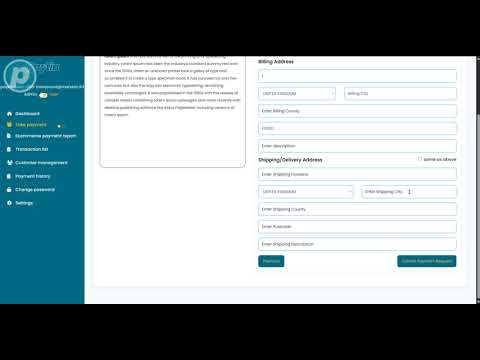
Watch our demonstration videos to see secure payment links in action.

Video thumbnail for secure link payments tutorial

Secure Link Payments Tutorial

Learn how to use our secure payment links for email payment collection with step-by-step guidance.

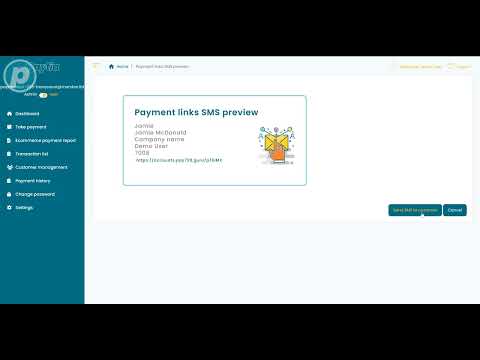
Video thumbnail for SMS secure payment links demo

SMS Secure Payment Links

Learn how to send secure payment links via SMS to your customers for easy mobile payments.

One Interface, Multiple Payment Methods

Your agents can handle all payment types from one simple, intuitive dashboard. No more switching between different systems or complex training requirements.

Simpler Agent Experience

Payment Links

Generate secure payment links instantly with pre-filled customer details and custom reference numbers.

Telephone Payments

Process secure phone payments with DTMF suppression and PCI-compliant call recording.

Bank-to-Bank Transfers

Enable direct bank transfers with real-time verification and instant settlement.

Agent Dashboard Preview

Payment MethodPayment Link
Customer ReferenceINV-2025-001
Amount$125.00
Generate Payment Link

Support for Apple Pay, Google Pay and Beyond

Paytia adapts to support any payment type your customers want to use from payment gateways. Whether it is digital wallets, card payments, or emerging methods, you get maximum control and flexibility.

Apple Pay logo

Apple Pay

One-touch payments for iOS and macOS users with Apple's secure digital wallet integration.

Google Pay logo

Google Pay

Fast, secure payments for Android users and web-based transactions with Google's trusted payment platform.

Any Payment Type

Paytia adapts to support any payment method your customers prefer from your payment gateway.

Gateway-Agnostic Platform

Connect to any payment gateway and use their supported payment methods, from traditional cards to emerging digital wallets.

Customer Choice

Let customers pay their way, whether Apple Pay, Google Pay, cards, bank transfers, or any other method your gateway supports.

Ready for What's Next

As new payment methods emerge, Paytia adds support without requiring platform changes or upgrades from your side.

You Are In Control

Configure which payment methods to offer, set regional preferences, and customise the experience for your business needs.
Advanced Features

Custom Email Server

Send emails through your own server and domain so payment notifications arrive from your address, not a third-party sender — better deliverability, stronger brand recognition.

Company Logo

Add your company logo to email templates for a professional, branded appearance that reinforces customer trust.

Support Email

Add your customer services email to templates, ensuring enquiries are directed to your team.

Button Links

Links sent as buttons rather than raw URLs, building customer trust and reducing suspicion about clicking unknown links.

QR Code Payment Generation

Generate QR codes instantly for customised payment pages. Customers scan and pay with pre-filled details, reference numbers, and your branding.

Instant QR Generation

Create QR codes in seconds with all payment details pre-configured. No complex setup or technical knowledge required.

Pre-filled Details

Customer information, amounts, and reference numbers are automatically populated, reducing errors and speeding up payments.

Branded Experience

QR codes lead to fully branded payment pages with your logo, colours, and messaging for a professional customer experience.

Eliminate Payment Confusion

Pre-filled payment details mean customers know exactly what they are paying for, how much, and to whom. No more phone calls asking about invoices.

Pre-Filled Amounts

Payment amounts are set before the link is sent, so customers cannot underpay or overpay.

Reference Numbers

Each link carries a unique reference so payments are matched to invoices automatically.

Branded Pages

Customers see your company name and logo, reinforcing trust and reducing fraud concerns.

Real-Time Tracking

See when links are opened, when payments are started, and when they complete -- all in one dashboard.

What Your Customer Sees

Customers receive a professional, branded payment page with all details pre-filled. They simply confirm and pay -- no typing, no confusion, no errors.

Amount and reference pre-filled automatically
Security code verification for two-factor authentication
3D Secure 2 authentication for card payments
Branded with your company logo and colours
Link expiry date clearly displayed

Payment Request

Invoice #INV-2025-001

Amount Due:$125.00
Security Code:4729
Expires:24 hours
Pay Securely Now

Secure payment processed by Paytia

Frequently Asked Questions

What are advanced payment links and how do they work?
Advanced payment links are secure, PCI DSS compliant URLs that businesses send to customers via SMS, email, or chat to collect payments. They include additional security features like 4-digit security codes, QR code generation, a unified agent interface, and customisable branding.
How do 4-digit security codes enhance payment link security?
A unique 4-digit code is created and sent separately to the customer. This two-factor authentication approach ensures only the intended recipient can access the payment page, reducing the risk of unauthorised access and fraud.
Can payment links be customised with company branding?
Yes, payment links can be fully customised with your company logo, colours, and custom email servers. This creates a consistent, professional payment experience that matches your brand identity and builds customer trust.
How do QR codes work with payment links?
QR codes are generated for each payment link. Customers scan with their mobile device to access the payment page instantly. This is useful for in-person transactions, printed invoices, or marketing materials.
Can payment links expire?
Yes, payment links can be configured with expiration dates and times to enhance security and encourage timely payments. Expired links automatically become invalid, preventing unauthorised access.
Are advanced payment links PCI DSS compliant?
Yes, all payment links are fully PCI DSS Level 1 compliant. Paytia handles all card data processing securely, ensuring sensitive information never touches your systems.
How can payment links improve cash flow?
Payment links reduce friction, enable faster collection, and automate follow-up processes. Customers can pay immediately upon receiving a link, reducing the time between invoice and payment.
What is a unified agent interface for payment links?
A unified agent interface provides a single dashboard where agents can generate payment links, track payment status, manage QR codes, and monitor transactions in real-time. This centralised system simplifies payment collection, reduces manual work, and enables agents to provide better customer support.

Get paid faster with secure payment links

Send a branded payment link via SMS or email, add a 4-digit security code, and let customers pay in seconds — all within Paytia's PCI DSS Level 1 certified environment.

PCI DSS Level 1
Cyber Essentials Plus

Trusted by law firms, insurers, healthcare providers and regulated businesses worldwide. Learn more about Paytia

Related solutions

Other ways to take payments in this channel.