Send a secure link. Get paid in seconds.
Send, Click, Pay
Branded payment links via email, SMS, or chat
Why businesses choose Paytia payment links
Secure, branded, and flexible payment links that reach customers on any channel.
A better payment experience
Creating and sharing a payment link takes a few clicks, and your customer pays on a secure, branded page — no app, no account, and no card details read aloud to an agent.
Multi-Channel Distribution
Share payment links through email, SMS, chat applications, or embed them in invoices. Reach your customers wherever they are with the channel they prefer.
3D-Secure Transactions
All payment links direct customers to a 3D-secure, PCI DSS-compliant payment page. Sensitive information is always protected, building trust and encouraging timely payments.
White-Label Branding
Customise payment pages with your logo, brand colours, and company information. Create a consistent, professional experience that reinforces your brand identity.
Link Expiry Settings
Set specific expiry times for payment links to add security and urgency. Expired links cannot be used, reducing risk while encouraging prompt payment completion.
Secure Code Verification
Paytia Secure Code provides a verification code that helps customers confirm the legitimacy of payment links, reducing phishing risk and building customer confidence.
More control over your payment links
Custom Email Sending
Send emails through your own email server and domain — your branding, not ours — for better deliverability and customer recognition.
Branded Email Templates
Add your company logo to Paytia email templates for a professional, branded appearance that reinforces customer trust.
Custom Support Email
Add your own customer services email address to templates, directing enquiries to your team for prompt assistance.
Button-Based Links
Links sent as buttons rather than raw URLs in email templates. Builds customer trust and reduces suspicion about clicking unknown links.
Send links for payment via email, SMS, or chat
Create a secure payment link
Create a payment link for your customer through the Paytia dashboard or user interface. Set the amount, add a reference, and choose your delivery method.
Send via email, SMS, or chat
Select to send the payment link via email, SMS, or your preferred communication channel. Customers receive a branded, professional payment request.
Customer clicks and pays
Customer clicks the link and is taken to a secure, branded payment page. They enter their card details on the 3D-secure, PCI-compliant page.
Payment confirmed in real time
Payment is processed securely with real-time notification of completion. Both you and your customer receive instant confirmation.
Fast
Time to pay via SMS
High
Open rates via SMS
24/7
Payments never sleep
PCI L1
Fully certified
Watch how payment links work
Watch our demonstration videos to see secure payment links in action.
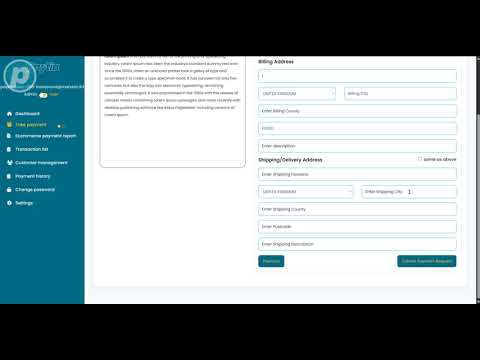
Secure Link Payments Tutorial
Learn how to use our secure payment links for email payment collection.
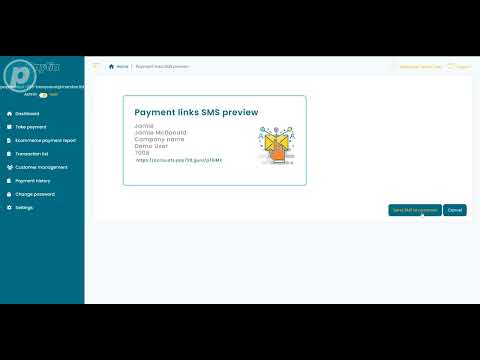
SMS Secure Payment Links
Learn how to send secure payment links via SMS to your customers for easy mobile payments.
What your customers see
Your customer receives a branded, PCI DSS-compliant payment page with the amount and invoice reference already filled in. If you've sent a Secure Code, they can verify the link is legitimate before entering any card details. There's no account to create, no app to install — just click and pay.
Simple, branded, secure
Use Paytia's dashboard or API to generate payment links in seconds. The payment page carries your logo and brand colours — not ours. Add a Secure Code and your customers have a way to verify the request is real before they hand over any card details.
- Your logo and brand colours on the payment page
- Clear amount and invoice reference displayed
- 3D-secure authentication for card transactions
- Instant on-screen, email, and SMS confirmation
- Mobile-responsive design for any device
Payment Request
Invoice #INV-2025
Amount Due:
$125.00
Secure payment processed by Paytia
Industries using secure payment links
Healthcare
Send payment links for consultation fees, co-pays, and treatment plans. Patients pay at their convenience without phone calls.
Professional Services
Invoice clients for legal, accounting, and consulting services with secure payment links embedded directly in invoices.
Property Management
Collect rent, deposits, and service charges via payment links sent through your preferred communication channel.
Education
Collect tuition fees, course payments, and enrolment charges through branded payment links sent to students and parents.
Retail & E-commerce
Send payment links for custom orders, deposits, and balance payments. Convert phone and chat enquiries into sales.
Utilities & Telecoms
Send one-off and recurring bill payment links to customers via SMS for fast, convenient bill settlement.
Comparing approaches
Sending a link is one option; routing customers to a hosted page is another. Our piece on pay-by-link versus hosted checkout covers when each fits — by channel, by ticket size, and by the kind of friction your customers will tolerate.
Frequently asked questions
What are secure payment links and how do they work?+
Secure payment links are PCI DSS compliant URLs that businesses send to customers via email, SMS, or chat. Customers click the link and are directed to a secure, branded payment page to complete their transaction. Payment data is processed without exposing sensitive card details.
How secure are Paytia payment links?+
Fully PCI DSS Level 1 compliant with 3D-secure authentication. All links direct to encrypted, PCI-compliant payment pages. Payment data never touches your business systems, significantly reducing your PCI compliance scope.
Can I customise payment links with my branding?+
Yes. White-label branding lets you customise payment pages with your logo, colours, and company information. You can also customise email templates, send from your own domain, and add your customer service email address.
What is Paytia Secure Code?+
A verification code feature that helps build customer trust by providing a confirmation code customers use to verify the legitimacy of payment links. This reduces phishing risk and helps customers feel confident they are clicking legitimate requests.
Can I set expiry times for payment links?+
Yes. Set specific expiry times to add security and create urgency. This reduces the risk of unauthorised access and encourages timely payment completion.
How do I send payment links to customers?+
Through email, SMS, chat applications, or embedded in invoices. Paytia provides customisable email templates with button-based links. You can also send through your own email server and domain.
Do payment links integrate with my existing systems?+
Yes. Integration with CRM platforms, accounting software, invoicing systems, and payment gateways through standard API connections. Automated reconciliation with your financial records.
What happens after a customer completes payment?+
You receive real-time notifications confirming the transaction. Customers receive immediate confirmation through on-screen display, email, and SMS. The system integrates with your existing notification workflows.
Ready to send secure payment links?
Start sending branded, PCI-compliant payment links via email, SMS, or chat. Book a demo today. Or explore our telephone payment options options.
“Paytia turned a security exposure and reputational risk into an opportunity. Fundraising has never been more important and Paytia has helped us achieve our goals.”
Trinity Hall College
Cambridge University
Read the case study →Used by British American Tobacco · Howard Kennedy · CITB · Clinical Partners · Trinity Hall College
Since 2016
Building secure payments
PCI DSS Level 1
Highest certification
99.99%
Platform uptime
£400M+
Transactions processed
Related solutions
Other ways to take payments in this channel.
Advanced Payment Links
Branded links with 4-digit security codes and a unified agent interface.
Learn moreCustomised Web Checkout
Fully branded Stripe-backed checkout pages with custom fields and payment rules.
Learn moreSecure Web Payments
Hosted web payment pages with full PCI DSS Level 1 scope offload.
Learn more