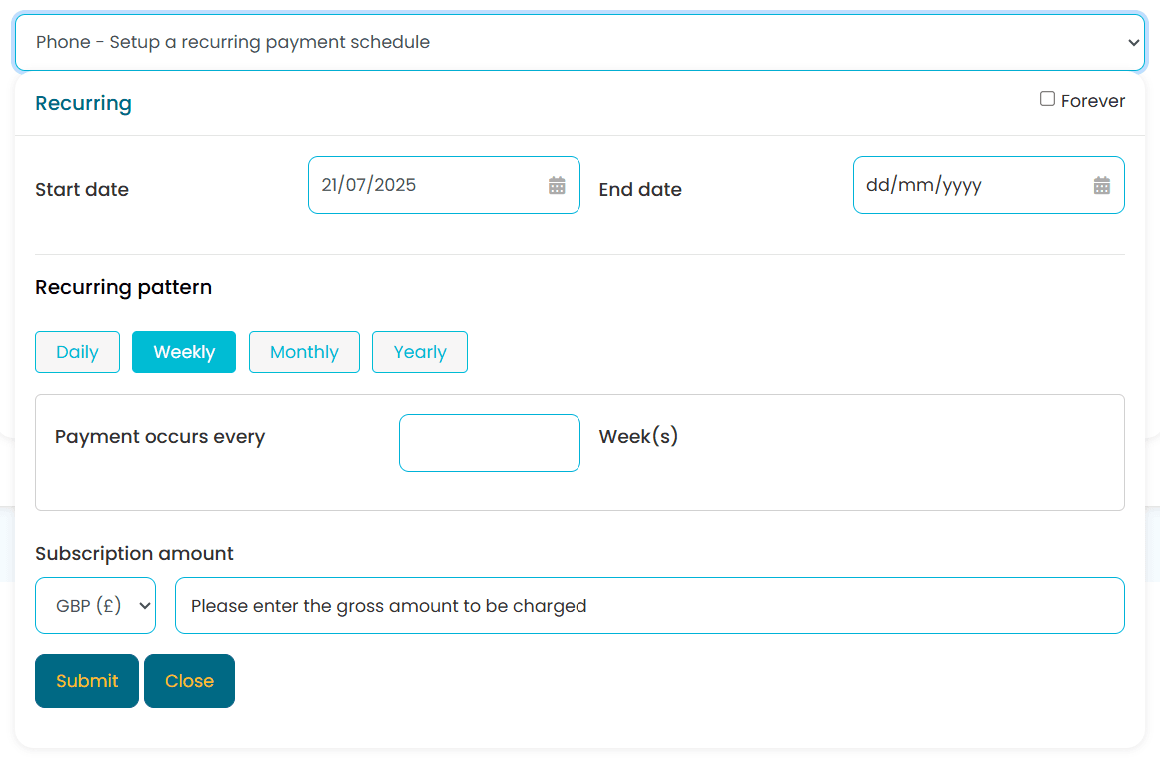
Set up a recurring plan while the customer is still on the phone
Most providers only let customers set up recurring payments online themselves. With Paytia, your agents can configure the schedule, frequency, and amount during a live call — the customer enters card details securely via DTMF, never reading them aloud. The plan starts, the card is tokenised, and every future payment runs automatically. PCI DSS Level 1 compliant throughout.
Choose setup method — agent call or self-service link
Configure the plan — frequency, amount, start date
Card tokenised securely (PCI DSS Level 1)
Payments run automatically with retries and reporting
Why Recurring Payments
Set up a payment plan in one call — then it runs itself
Manual payment collection is expensive and unreliable. Recurring payment plans automate the entire process, giving your business predictable cash flow while reducing the administrative burden of chasing invoices and processing individual transactions.
1×
Setup — on the first call
Agents configure the plan while the customer is on the line. No follow-up links, no abandoned forms — the recurring plan is active before the call ends.
0
Card details heard by agents
Customers enter card details using DTMF keypad tones. The agent never hears or sees the number. The card is tokenised immediately and never stored on your systems.
Auto
Every payment after that
Once the plan is set, Paytia handles every charge, retry, and notification automatically. Your team only steps in when a customer needs to change something.
Key Features
Everything you need for recurring payments
Two flexible methods for setting up and managing automated payment collection, backed by PCI DSS Level 1 certified infrastructure and detailed payment reporting.
Agent-Assisted Setup
Your agents set up recurring payment plans during live telephone calls. Configure start dates, recurring patterns, payment intervals, and amounts directly in the call flow. Customers receive instant confirmation and a clear summary of their plan details before the call ends.
Customer-Actionable Links
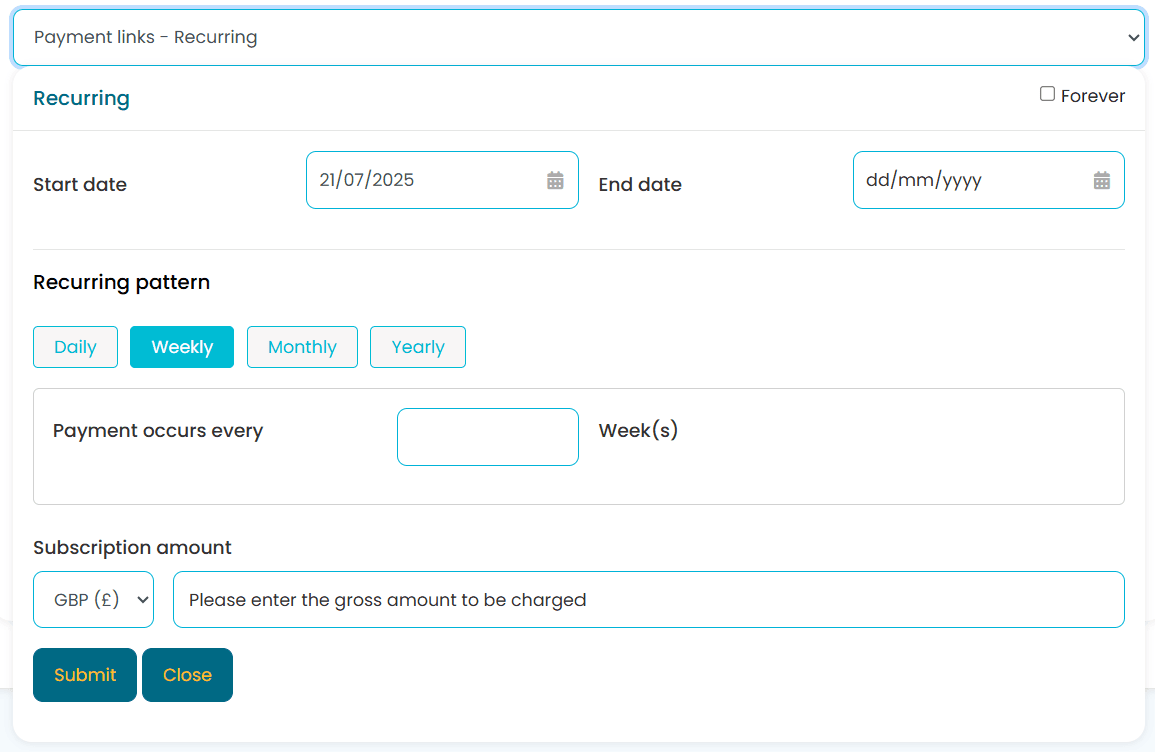
Send secure payment links to customers for self-service plan activation. Customers configure their own schedules, amounts, and payment preferences at their convenience. Links can be distributed via email, SMS, or embedded in your customer portal.
Flexible Scheduling
Daily, weekly, bi-weekly, monthly, quarterly, semi-annual, and annual schedules. Set custom intervals, end dates, and subscription amounts with full currency support. Create fixed-term plans that automatically expire or open-ended plans that continue until cancelled.
Secure Tokenisation
Card details are replaced with a unique token at the point of capture using PCI DSS Level 1 compliant infrastructure. Original card numbers are never stored in your systems. Tokens are used for every subsequent charge — customers never have to re-enter their card details. Learn more about how tokenisation protects your business.
Automatic Retries & Notifications
Failed payments are automatically retried according to your configured schedule. Receive real-time notifications about failures and send automated reminders to customers to update payment information. Configurable retry intervals prevent unnecessary card declines.
Payment Reporting & Analytics
Track every recurring payment with detailed dashboards showing success rates, revenue forecasts, upcoming charges, and customer payment history. Export data to your accounting software or access it through our API for custom reporting.
How It Works
Two ways to set up recurring payments
Choose the method that best suits your business and your customers. Many businesses use both approaches -- agent-assisted for high-value customers and self-service links for scale.
Agent-Assisted Telephone Setup
Your agents configure recurring payment schedules during live phone calls with customers. Set start dates, patterns, intervals, and amounts directly in the call flow. The customer enters their card details securely using DTMF tones -- your agent never hears or sees the card number, ensuring full PCI DSS compliance.
This method is particularly effective for businesses where personal interaction builds trust, such as insurance, healthcare, and professional services. Agents can answer questions about billing in real time while setting up the payment plan.
Real-time setup during customer calls
Daily, weekly, monthly, or yearly patterns
Immediate payment authorisation and scheduling
Fixed-term or ongoing payment plans
Agent never sees or hears card data
Instant email confirmation to customers
Customer Self-Service Online Forms
Create secure payment links that customers use to set up their own recurring plans. Business users configure the framework, then customers complete activation at their convenience. Card data is captured securely and tokenised immediately -- it never touches your systems.
Self-service links are ideal for scaling your recurring payment collection without increasing staff workload. Distribute links via email campaigns, embed them on your website, or include them in customer onboarding flows.
Self-service customer activation
Secure payment link distribution via email, SMS, or portal
Complete online plan management
Reduces administrative overhead
Mobile-responsive payment forms
Configurable link expiry for security
Payment Lifecycle
From card capture to automatic renewal
Paytia manages the full recurring payment lifecycle. Once a customer enrols, every subsequent charge, retry, notification, and report is handled automatically.
1
Card Capture & Tokenisation
Customer provides card details via phone or online form. Paytia tokenises the data immediately -- the original card number is never stored. The token is linked to the recurring plan.
2
Schedule Configuration
Set the billing frequency, start date, amount, and optional end date. Plans can be daily, weekly, monthly, quarterly, or annual. Configure retry rules and notification preferences.
3
Automatic Charging
On each billing date, Paytia charges the stored token automatically. Successful payments are logged and confirmed. Failed payments trigger configurable retry sequences.
4
Reporting & Reconciliation
Every transaction is tracked with full audit trails. Revenue dashboards, failed payment analysis, and export tools keep your finance team informed. API webhooks trigger downstream workflows.
Use Cases
Industries using recurring payment plans
Recurring billing is used across every industry where regular payment collection is required. Here are some of the most common use cases.
Subscription Services
Software companies, streaming services, and SaaS providers use recurring plans for monthly and annual subscriptions with automatic renewal. Paytia handles the payment lifecycle from trial conversion through to renewal, with secure tokenised card storage eliminating the need for customers to re-enter details.
•Monthly software licences
•Trial-to-paid conversions
•Tiered pricing plans
Healthcare & Insurance
Medical practices and insurance providers collect monthly premiums, co-pays, and payment plan instalments through automated billing. Recurring payment plans help healthcare organisations maintain predictable cash flow while offering patients manageable payment schedules for larger treatment costs.
•Insurance premium collection
•Medical payment plans
•Monthly co-pay billing
Utilities & Services
Utility companies, telecom providers, and service businesses automate monthly billing cycles and payment collection. Recurring plans take manual invoicing out of the picture, and automated retries recover failed payments without staff intervention.
•Utility bill automation
•Telecom service billing
•Maintenance contracts
Membership Organisations
Clubs, associations, and membership-based businesses automate dues collection and membership renewals with flexible scheduling. Automated recurring billing eliminates the administrative burden of chasing renewal payments and reduces involuntary membership lapses.
•Annual membership dues
•Professional association renewals
•Gym and fitness memberships
Security
How recurring payments are protected
Every recurring transaction is processed through PCI DSS Level 1 compliant infrastructure with multiple layers of protection. Your business never handles or stores raw card data.
Secure Tokenisation
Card details are replaced with a unique token at the point of first capture. All subsequent recurring charges use the token -- original card data is never stored. Learn more about tokenisation and how it reduces your compliance burden.
Encryption in Transit and at Rest
Payment data is encrypted in transit using TLS 1.2+ and at rest using AES-256. Your business never sees or handles raw card numbers at any stage of the recurring payment process.
Automatic Fraud Screening
Every recurring charge is screened for anomalies including velocity checks, geolocation analysis, and pattern recognition before processing. Suspicious transactions are flagged for review.
Customer Consent Management
Built-in consent tracking ensures you have an auditable record of customer authorisation for every recurring payment plan. Clear opt-in processes protect both you and your customers.
PCI DSS Level 1
Paytia maintains the highest PCI certification level. Annual QSA audits confirm compliance across all recurring payment channels. Your PCI scope is dramatically reduced because card data never enters your environment.
GDPR Compliant
Customer data is processed and stored in accordance with GDPR requirements. Data residency within UK/EU data centres. Customers can request data access or deletion at any time.
Recurring payment plans allow businesses to automatically collect payments from customers on a scheduled basis. This is ideal for subscriptions, memberships, instalments, and regular service fees. Paytia supports flexible scheduling through agent-assisted telephone calls or secure online forms, with all card data protected by PCI DSS Level 1 compliant tokenisation.
How do I set up recurring payment plans?
Two ways: through agent-assisted telephone calls where your staff helps customers enrol, or by sending secure online forms that customers complete themselves. Both methods are PCI DSS compliant and include fraud prevention. Setup typically takes just a few minutes per customer. Your agents can configure start dates, frequencies, amounts, and end dates during the call.
What payment frequencies are supported?
Daily, weekly, bi-weekly, monthly, quarterly, semi-annual, and annual schedules. You can also set up custom intervals to match specific business needs. The system supports both fixed-term plans (e.g. 12 monthly payments) and ongoing payment plans that continue until cancelled.
What happens if a recurring payment fails?
The payment gateway retries the payment according to your configured schedule. You receive notifications about failures, and the system sends automated reminders to customers to update their payment information. This maintains payment continuity and reduces manual follow-up. You can configure the number of retry attempts and the interval between them.
Can customers manage their own plans?
Businesses can use the Paytia API to build setup and adjustment functionality displayed in their own customer portals. This creates a customised self-service experience for managing recurring plans according to your business requirements. Customers can update card details, view upcoming payments, and manage their subscriptions.
How does recurring billing ensure PCI DSS compliance?
Paytia maintains PCI DSS Level 1 compliance for all recurring processing. Sensitive card data is encrypted and tokenised at the point of capture -- your business never handles raw card data. Tokens are used for all subsequent charges, significantly reducing your PCI compliance scope. Learn more about PCI DSS compliance and what it means for your business.
How do recurring payments integrate with my systems?
Recurring payments integrate with CRM platforms, accounting software, invoicing systems, and payment gateways through standard API connections and webhooks. This enables automated reconciliation with your financial records, real-time event notifications, and synchronised customer data across all systems.
How do I stop unwanted recurring payments?
Most systems let you manage and cancel recurring plans directly from your merchant dashboard. As a business, it is important to provide an easy way of cancellation to prevent disputes and maintain customer trust. Agent-assisted payment features can also help customers cancel or adjust recurring plans securely during a phone call.
What is the difference between a one-time payment and a recurring payment?
A one-time payment is made once for a product or service. Recurring payments occur automatically at set intervals (weekly, monthly, annually). Recurring plans are suitable for subscriptions, memberships, or perpetual services, providing predictable revenue for businesses and convenience for customers. Paytia supports both payment types through the same platform.
How to take recurring payments over the phone?
Use Paytia's agent-assisted recurring payment setup. Your agent initiates the payment flow during a live call, the customer enters their card details securely using DTMF tones (the agent never hears or sees the card number), and the system tokenises the card for future recurring charges. The entire process is PCI DSS Level 1 compliant.
Ready to automate your payment collection?
See Paytia recurring payments in action. Book a personalised demo with our team and see exactly how automated billing improves your cash flow and cuts admin time.