Set up a recurring plan while the customer is still on the phone
Recurring Payment Setup
Two flexible methods for automated billing
Set up a payment plan in one call — then it runs itself
Manual collection is expensive and unreliable. Recurring plans automate the whole thing, which gives your business predictable cash flow and kills the admin work of chasing invoices one charge at a time.
1×
Setup — on the first call
Agents configure the plan while the customer's on the line. No follow-up links, no abandoned forms — the recurring plan is active before the call ends.
0
Card details heard by agents
Customers enter card details using DTMF keypad tones. The agent never hears or sees the number. The card is tokenized immediately and never stored on your systems.
Auto
Every payment after that
Once the plan's set, Paytia handles every charge, retry, and notification. Your team only steps in when a customer wants to change something.
Everything you need for recurring payments
Two flexible ways to set up and manage automated collection, backed by PCI DSS Level 1 certified infrastructure and detailed payment reporting built for US finance teams.
Agent-Assisted Setup
Your agents set up recurring payment plans during live phone calls. Configure start dates, frequency, payment intervals, and amounts right in the call flow. Customers get instant confirmation and a clear summary of plan details before the call ends.
Customer-Actionable Links
Send secure payment links to customers for self-service plan activation. Customers set their own schedules, amounts, and payment preferences when it suits them. Links go out by email, SMS, or embedded in your customer portal.
Flexible Scheduling
Daily, weekly, bi-weekly, monthly, quarterly, semi-annual, and annual schedules. Set custom intervals, end dates, and subscription amounts with full USD support. Fixed-term plans expire automatically, or leave it open-ended until the customer cancels.
Secure Tokenization
Card details are replaced with a unique token at the point of capture using PCI DSS Level 1 infrastructure. Original card numbers are never stored in your systems. Tokens handle every subsequent charge — customers don't have to re-enter their card. Learn more about how tokenization protects your business.
Automatic Retries & Notifications
Failed payments retry automatically on the schedule you set. You get real-time notifications and the system sends automated reminders asking customers to update their payment info. Configurable retry intervals stop unnecessary card declines.
Payment Reporting & Analytics
Track every recurring payment with dashboards showing success rates, revenue forecasts, upcoming charges, and customer payment history. Export to QuickBooks or NetSuite, or pull the data through our API for custom reporting.
Two ways to set up recurring payments
Pick the method that fits your business and your customers. Plenty of our US clients use both — agent-assisted for high-value accounts, self-service links for scale.
Agent-Assisted Phone Setup
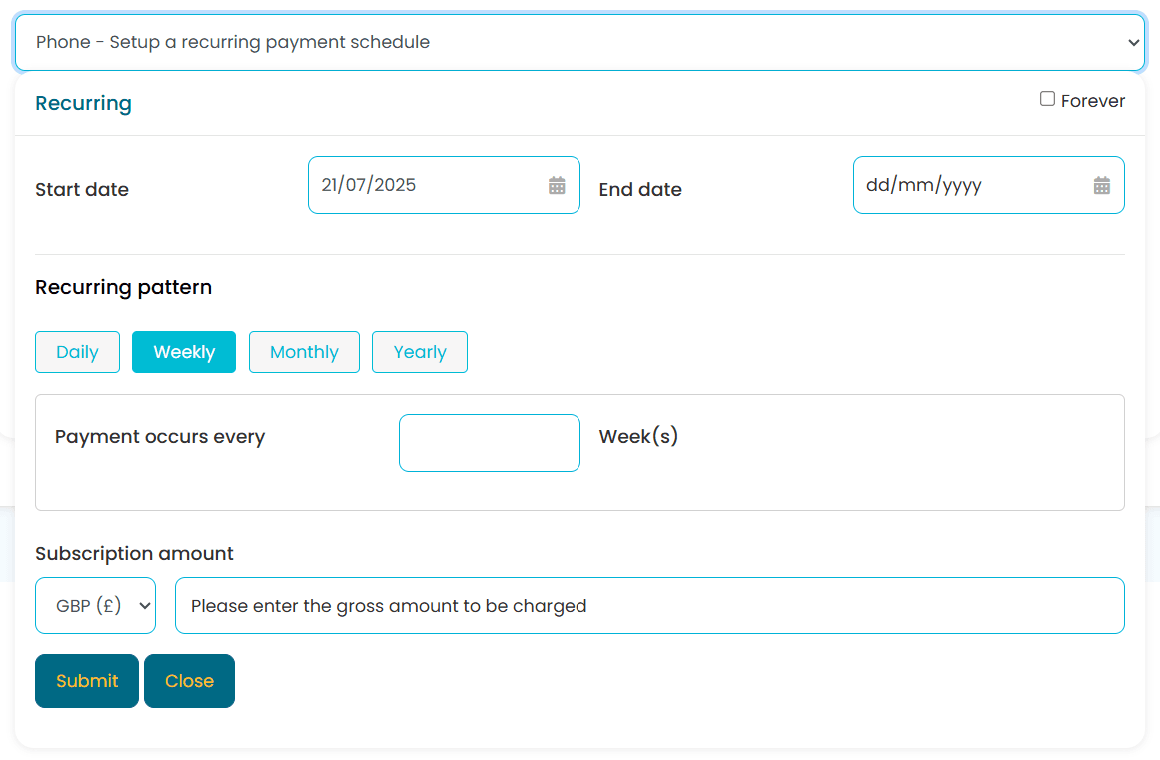
Your agents configure recurring schedules during live calls. Set start dates, patterns, intervals, and amounts right in the call flow. The customer enters card details using DTMF tones — your agent never hears or sees the number, which keeps you fully PCI DSS compliant. For outbound enrollment calls, the flow captures express written consent where TCPA requires it.
This works especially well where personal interaction builds trust — insurance, healthcare, and professional services. Agents can answer billing questions in real time while the plan is being set up.
- Real-time setup during customer calls
- Daily, weekly, monthly, or yearly patterns
- Immediate payment authorization and scheduling
- Fixed-term or ongoing payment plans
- Agent never sees or hears card data
- Instant email confirmation to customers
Customer Self-Service Online Forms
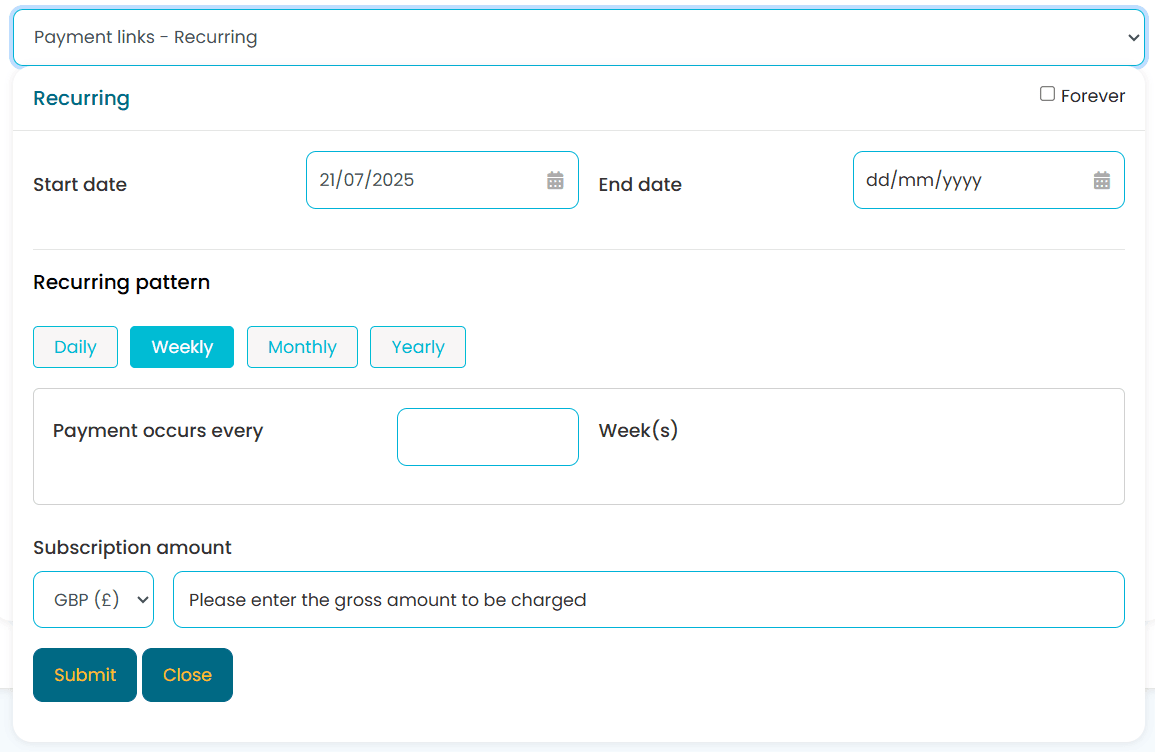
Create secure payment links that let customers set up their own recurring plans. You configure the framework, customers finish activation when they have time. Card data is captured securely and tokenized immediately — it never touches your systems.
Self-service links are how you scale recurring collection without adding staff. Drop links into email campaigns, embed them on your site, or put them into the onboarding flow.
- Self-service customer activation
- Secure payment link distribution via email, SMS, or portal
- Complete online plan management
- Reduces administrative overhead
- Mobile-responsive payment forms
- Configurable link expiry for security
From card capture to automatic renewal
Paytia runs the full recurring payment lifecycle. Once a customer enrolls, every subsequent charge, retry, notification, and report is handled automatically.
Card Capture & Tokenization
Customer provides card details via phone or online form. Paytia tokenizes the data immediately — the original card number is never stored. The token is linked to the recurring plan.
Schedule Configuration
Set the billing frequency, start date, amount, and optional end date. Plans can be daily, weekly, monthly, quarterly, or annual. Configure retry rules and notification preferences.
Automatic Charging
On each billing date, Paytia charges the stored token automatically. Successful payments get logged and confirmed. Failed payments trigger the retry sequence you've configured.
Reporting & Reconciliation
Every transaction is tracked with full audit trails. Revenue dashboards, failed payment analysis, and exports into QuickBooks or NetSuite keep your finance team informed. API webhooks kick off downstream workflows.
Industries using recurring payment plans
Recurring billing shows up in every industry where regular collection matters. Here are the US use cases we see most.
Subscription Services
SaaS companies, streaming services, and software vendors use recurring plans for monthly and annual subscriptions with automatic renewal. Paytia handles the full payment lifecycle from trial conversion through renewal, with tokenized card storage so customers never have to re-enter details.
- •Monthly software licenses
- •Trial-to-paid conversions
- •Tiered pricing plans
Healthcare & Insurance
US medical practices and insurers collect monthly premiums, copays, and payment plan installments through automated billing. Recurring plans help healthcare organizations keep predictable cash flow and give patients manageable schedules for larger treatment costs. HIPAA-aware handling of any PHI that touches the billing flow.
- •Insurance premium collection
- •Medical payment plans
- •Monthly copay billing
Utilities & Services
Utility companies, telecom providers, and home service businesses automate monthly billing and collection. Recurring plans take manual invoicing out of the picture, and automated retries recover failed payments without staff stepping in.
- •Utility bill automation
- •Telecom service billing
- •Maintenance contracts
Membership & Nonprofits
Clubs, associations, gyms, and US nonprofits automate dues, recurring donations, and renewals with flexible scheduling. Automated billing takes the chase-work out of renewal season and cuts involuntary lapses. Pair card-based plans with NACHA ACH for donors who prefer bank debits.
- •Annual membership dues
- •Recurring 501(c)(3) donations
- •Gym and fitness memberships
How recurring payments are protected
Every recurring transaction runs through PCI DSS Level 1 infrastructure with multiple layers of protection. Your business never handles or stores raw card data.
Secure Tokenization
Card details are replaced with a unique token at the point of first capture. All subsequent recurring charges use the token — original card data is never stored. Learn more about tokenization and how it cuts your compliance burden.
Encryption in Transit and at Rest
Payment data is encrypted in transit using TLS 1.2+ and at rest using AES-256. Your business never sees or handles raw card numbers at any stage of the recurring payment process.
Automatic Fraud Screening
Every recurring charge gets screened for anomalies — velocity checks, geolocation analysis, and pattern recognition — before it processes. Suspicious transactions are flagged for review.
Customer Consent Management
Built-in consent tracking gives you an auditable record of customer authorization for every recurring plan. Clear opt-in flows protect you and your customers, and align with TCPA requirements for outbound enrollment calls.
PCI DSS Level 1
Paytia maintains the highest PCI certification level. Annual QSA audits confirm compliance across every recurring channel. Your PCI scope shrinks dramatically because card data never enters your environment.
HIPAA & Privacy-Aware
Customer data is handled in line with US state privacy laws (CCPA/CPRA and the newer state frameworks) and, for healthcare clients, HIPAA-aware controls around any PHI that touches the billing flow. Customers can request data access or deletion through your team.
Explore related Paytia solutions
Telephone Payments
Take secure card payments over the phone with PCI DSS compliant DTMF masking. Ideal for US contact centers that pair phone payments with recurring billing.
Learn morePayment Links
Send secure one-time or recurring payment links via email, SMS, or your website. Customers pay when and where it suits them, on any device.
Learn moreMobile Payments
Take payments in the field with our PayMobile app for Stripe. Process secure card payments from any iOS device with biometric authentication.
Learn moreFrequently asked questions
What are recurring payment plans?+
Recurring payment plans let businesses automatically collect payments from customers on a set schedule. They're a good fit for subscriptions, memberships, installment agreements, and regular service fees. Paytia supports flexible scheduling through agent-assisted phone calls or secure online forms, with all card data protected by PCI DSS Level 1 tokenization.
How do I set up recurring payment plans?+
Two ways. Your agents can enroll customers during a live phone call, or you can send secure online forms that customers complete themselves. Both methods are PCI DSS compliant and include fraud screening. Setup usually takes a few minutes per customer. Agents configure the start date, frequency, amount, and end date during the call.
What payment frequencies are supported?+
Daily, weekly, bi-weekly, monthly, quarterly, semi-annual, and annual schedules. You can also set custom intervals to match your business. The system handles both fixed-term plans (say, 12 monthly payments) and ongoing plans that run until someone cancels.
What happens if a recurring payment fails?+
The gateway retries the payment on the schedule you've set. You get notifications about failures, and the system emails or texts the customer asking them to update their card. That keeps payments flowing and cuts down on manual follow-up. You control how many retries and the gap between them.
Can customers manage their own plans?+
Yes. Use the Paytia API to build enrollment and self-management features into your own customer portal. That gives you a branded self-service experience where customers update card details, view upcoming charges, pause, or cancel their plan.
How does recurring billing stay PCI DSS compliant?+
Paytia holds PCI DSS Level 1 across every recurring channel. Card data is encrypted and tokenized at the point of capture — your business never touches raw card data. Every subsequent charge uses the token, which keeps your PCI scope small. Learn more about PCI DSS compliance and what it means for your business.
How do recurring payments integrate with my systems?+
Recurring payments plug into Salesforce, HubSpot, NetSuite, QuickBooks, and other US CRM, accounting, and invoicing platforms through standard API connections and webhooks. That means automatic reconciliation with your books, real-time event notifications, and customer data that stays in sync across systems.
How do I stop unwanted recurring payments?+
Most setups let you manage and cancel recurring plans directly from the merchant dashboard. You should always give customers an easy way to cancel — it prevents chargeback disputes and keeps trust intact. Agents can also cancel or adjust plans securely during a phone call.
What's the difference between a one-time payment and a recurring payment?+
A one-time payment is a single charge for a product or service. Recurring payments run automatically at set intervals — weekly, monthly, annually. Recurring plans work for subscriptions, memberships, and ongoing services, giving you predictable revenue and giving customers convenience. Paytia handles both through the same platform.
How do I take recurring payments over the phone?+
Use Paytia's agent-assisted recurring setup. The agent starts the payment flow during a live call, the customer enters card details securely using DTMF keypad tones (the agent never hears or sees the number), and the system tokenizes the card for every future charge. The whole process is PCI DSS Level 1 compliant, and outbound enrollment calls follow TCPA consent rules.
Ready to automate your payment collection?
See Paytia recurring payments in action. Book a demo with our US team — or call us on +1 315 716 2226 — and we'll show you exactly how automated billing improves cash flow and cuts admin time. We have offices in New York and London.
“Paytia turned a security exposure and reputational risk into an opportunity. Fundraising has never been more important and Paytia has helped us achieve our goals.”
Trinity Hall College
Cambridge University
Read the case study →Used by British American Tobacco · Howard Kennedy · CITB · Clinical Partners · Trinity Hall College
Since 2016
Building secure payments
PCI DSS Level 1
Highest certification
99.99%
Platform uptime
$500M+
Transactions processed
Related solutions
Other ways to take payments in this channel.
Payment Links
Send secure branded payment links by email, SMS, or chat. Expire them any time.
Learn moreAdvanced Payment Links
Branded links with 4-digit security codes and a unified agent interface.
Learn moreCustomized Web Checkout
Fully branded Stripe-backed checkout pages with custom fields and payment rules.
Learn more