Changing the default 9999.99 payment limit on Lloyds Cardnet LBOP
Lloyds caps transactions at 9999.99 out of the box. You can raise it yourself in the Virtual Terminal, but you'll need permission to change fraud settings first.
Changing the Maximum Payment Transaction Value in Lloyds Cardnet
These instructions explain how Lloyds Cardnet Virtual Terminal users can change the maximum payment amount that may be processed.
Before you begin
You will need:
- Your Lloyds Cardnet Virtual Terminal username and password.
- Access to the Administration section.
- Permission to change fraud settings.
Users without administrator permissions may not be able to see or change these settings.
1. Log in to Lloyds Cardnet
Open the Lloyds Cardnet Virtual Terminal login page.
Enter your:
- Username
- Password
Select Log in to open the Virtual Terminal.
2. Open the Administration section
From the main navigation menu at the top of the page, select:
Administration
The Administration page contains user management, fraud settings and transaction notification settings.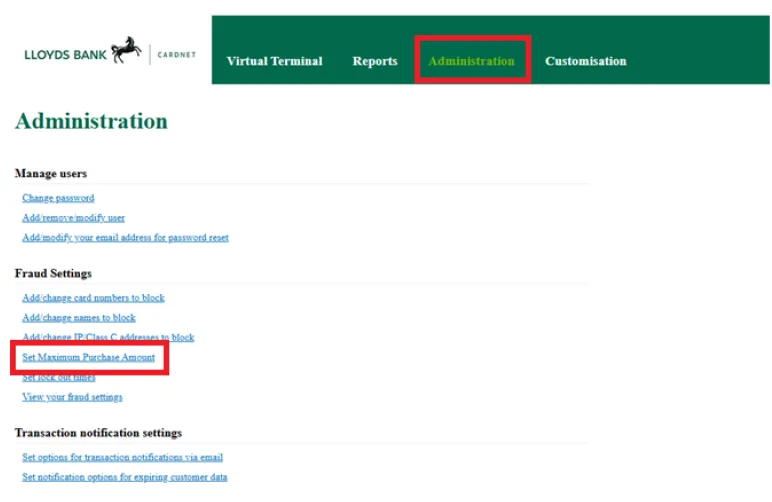
3. Open the maximum purchase amount settings
Under Fraud Settings, select: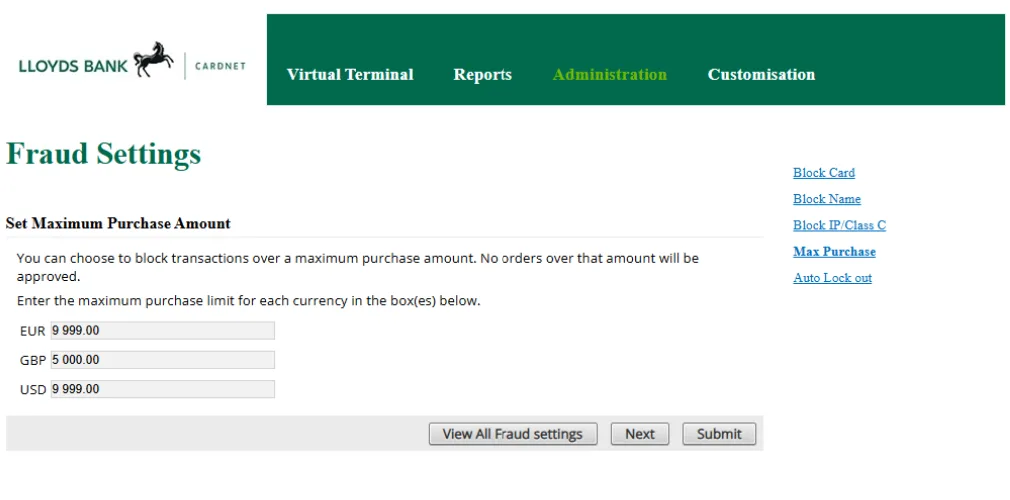
Set Maximum Purchase Amount
The Fraud Settings – Set Maximum Purchase Amount page will open.
4. Enter the required transaction limits
The page displays a separate maximum purchase amount for each supported currency, such as:
- EUR
- GBP
- USD
Enter the maximum value that may be processed for each currency.
For example, entering:
GBP 5,000.00
means that transactions above £5,000 will be blocked.
Use the correct currency format and include two decimal places where required.
5. Save the changes
After entering the required limits, select:
Submit
The updated transaction limits will then be applied to future payment attempts.
Transactions above the configured maximum purchase amount will not be approved.
6. Confirm the settings
To review the current fraud controls, select:
View All Fraud Settings
Check that the maximum purchase amounts shown are correct for each currency used by your organisation.
Important information
The maximum purchase amount is a fraud-control limit. It does not increase any processing limit applied to your Lloyds Cardnet merchant account.
Set the value high enough to cover legitimate customer payments, but not unnecessarily high. Before changing the limit, confirm the approved amount with your organisation’s administrator, finance team or payment-processing owner.
Where a payment exceeds the current maximum, an authorised user must update the setting before the transaction can be attempted again.
Still need help?
Our support team is here to help. Submit a ticket and we'll get back to you within one business day.