3CX: no DTMF from the agent softphones
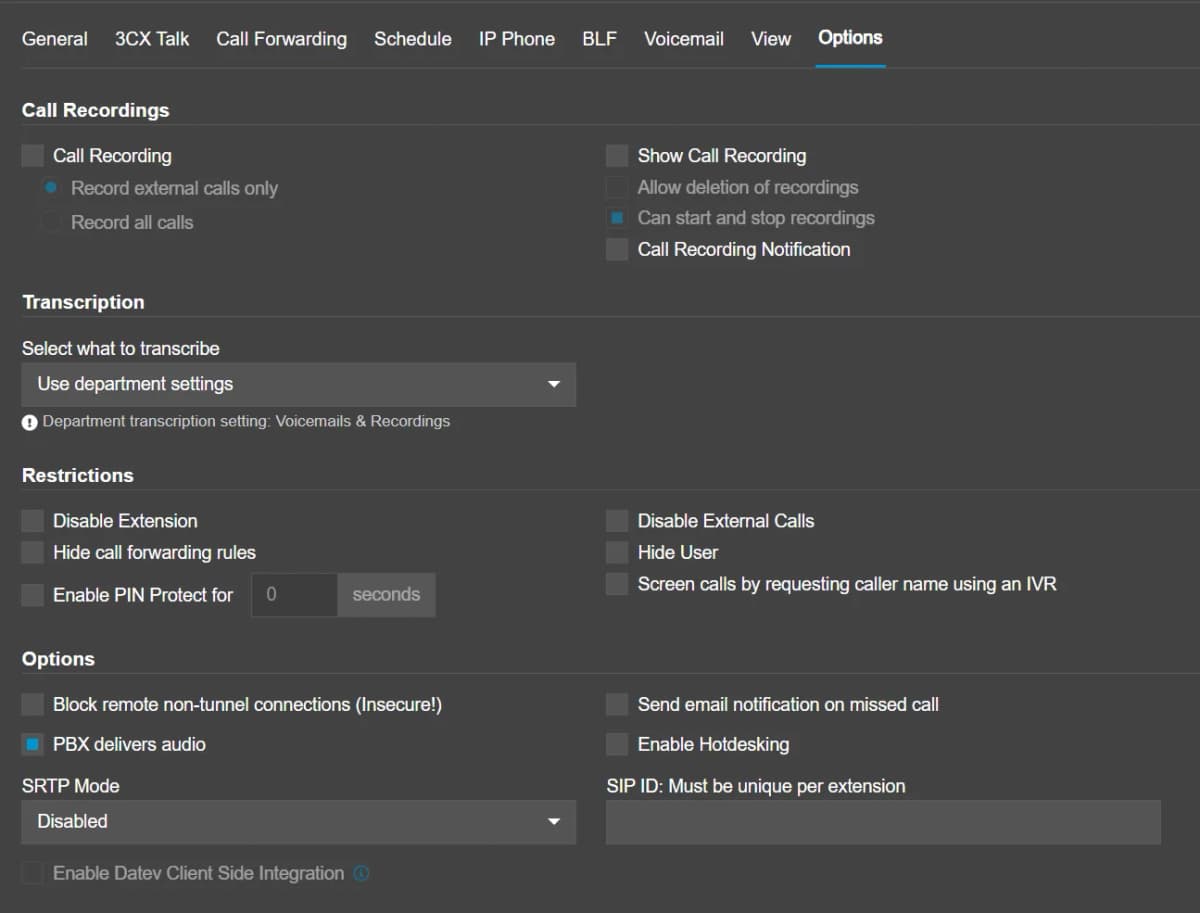
In order for 3CX agent externsions to generate DTMF key press tones you need to ensure the User profile in Options has PABX delvieres audio marked active See example below
See example below
More in 3CX
How do I configure SIP as a service from Paytia?
Setting up a SIP trunk between your phone system and Paytia needs a handful of settings agreed on both sides. Here's every one of them, and what to send us.
How do I set up Paytia to work with BT One Phone?
Two ways with BT One Phone: transfer to us only when a payment comes up, or route everything through us from the start. Here's how each one is built.
How Paytia’s Telephony Services Enable Secure and Compliant Phone Payments
Your calls route through our telephony service so we can spot when your agent dials 7-2-9 and take over the card capture. This explains what's happening on the line while that happens.
Technical Support Article: 3CX Sending Triple DTMF Tones Due to RTP Marker Bit Misconfiguration
Our engineers traced 3CX sending three DTMF tones per key press to an RTP marker bit set wrong on the 3CX side. Here's the packet evidence and the setting to change.
Still need help?
Our support team is here to help. Submit a ticket and we'll get back to you within one business day.