If your business takes calls over the internet — and in 2026, almost all of them do, now that BT has switched off the UK's old analogue PSTN network — then the technology running your phones is almost certainly built on SIP, the Session Initiation Protocol. It's the behind-the-scenes plumbing for VoIP calls, video conferencing, instant messaging, and basically every real-time communication service you use at work. This guide explains what SIP is, how it works, and what a contact centre needs to think about to keep card payments safe on a SIP-based phone system.
What is SIP?
SIP (Session Initiation Protocol) is the signalling standard that sets up, manages, and ends real-time communication sessions — voice calls, video calls, and instant messaging — over IP networks. It's the protocol your VoIP phone uses to tell another phone "I want to call you", agree how the audio will flow, and then hang up when the conversation is done.
Think of SIP as the traffic controller, not the road itself. SIP handles the "who's calling whom, using which codec, on which ports" conversation, then the actual audio travels over a separate protocol called RTP (Real-time Transport Protocol). Most modern UK contact centre platforms — 3CX, Aircall, ContactOne, Avaya, Cisco, Genesys, Talkdesk, Amazon Connect — use SIP under the hood.
Why SIP matters for phone payment security
For a contact centre taking card payments, SIP matters for one specific reason: it's where the DTMF tones from a customer's keypad travel. When a customer enters their card number on a phone call, the keypad tones are carried inside the SIP/RTP audio stream to the agent's headset and into the call recording. Without a control in place, that audio stream is a direct path to card data. DTMF masking works by intercepting those tones at the SIP layer and replacing them with flat audio before they reach the agent — which is why the control has to sit inside the SIP call path, not on the agent's workstation.
The Anatomy of a SIP Session
This back-and-forth negotiation is what makes SIP so powerful and flexible. The IETF first standardised it way back in 1999, taking inspiration from well-established internet protocols like HTTP. This solid foundation has allowed it to become the backbone for everything from simple phone calls to complex unified communications platforms.
The diagram below shows a simplified view of a SIP call being set up. You can see the initial INVITE message being sent from one phone to another, routed through a central proxy server.
This visual really highlights how SIP messages work as a series of requests and responses, much like your web browser talking to a website. A call is only connected once both ends have agreed on all the terms of the session.
To pull all this together, it helps to break down the key players involved in any SIP-based conversation. The table below summarises the core components and gives a simple analogy for each one.
Core Components of a SIP Session
| Component | Role in the Call | Real-World Analogy |
|---|---|---|
| SIP User Agent (Phone) | The endpoint device (e.g., a desk phone or softphone app) that initiates or receives calls. | The person making or answering a phone call. |
| SIP Proxy Server | Routes SIP messages between user agents, acting as a central coordinator for call traffic. | A telephone exchange switchboard operator. |
| Signalling (SIP) | The process of sending messages to set up, manage, and terminate the communication session. | The conversation arranging the meeting details. |
| Media Transport (RTP) | The separate protocol that carries the actual voice or video data once the call is connected. | The meeting room where the actual discussion happens. |
This clever separation of signalling (the setup) and media (the actual conversation) is what makes the SIP communication protocol so reliable. For any business looking to modernise its contact centre, getting a good grasp of these telephony fundamentals is the perfect place to start.
How a Standard SIP Call Actually Works
To really get your head around SIP, it helps to walk through what happens during a typical call. Let's say a customer phones your support centre. From the moment they dial to the second they hang up, a rapid-fire exchange of digital messages is happening behind the scenes. SIP is the conductor of this entire orchestra.
The journey kicks off when the customer's phone sends an INVITE message. You can think of this as a digital knock on the door. It signals the intent to start a conversation and carries important details about the caller and the kind of call they want to make (e.g., audio-only).
This INVITE zips over to a SIP server, which acts like a switchboard, finding the support agent's phone and passing the request along. If the agent's line is free, their phone replies with a provisional message like "180 Ringing" to let the customer's phone know that the call is connecting. This is what triggers the familiar ringing tone on the customer's end.
The Digital Handshake
When the agent picks up, their phone sends back a final 200 OK response. This is the "yes, I'm here and ready to talk" signal. This one message is packed with technical details that are negotiated using the Session Description Protocol (SDP). Think of SDP as the part of the conversation where both phones quickly agree on the ground rules.
SDP makes sure both ends of the call can understand each other by settling on things like:
- Audio Codecs — The specific digital audio format they'll use to encode and decode the conversation.
- IP Addresses & Ports — The exact network addresses where the actual voice data needs to be sent.
- Media Type — Confirming whether it's an audio call, a video call, or both.
Once this agreement is struck, the customer's phone sends one last ACK (Acknowledge) message. This completes the digital handshake, and the session is officially established. The call is now live.
With the signalling taken care of, SIP takes a step back. The actual voice conversation—the audio you hear—is carried by a different protocol entirely: the Real-time Transport Protocol (RTP). RTP is purpose-built for streaming audio and video data over the internet efficiently.
Managing and Ending the Call
SIP doesn't just disappear, though. It stays active in the background to manage the session. If the agent puts the customer on hold or needs to transfer the call, new SIP messages fly back and forth to update the session's status.
Finally, when the call is over and someone hangs up, their phone sends a BYE message. The other phone confirms this with another 200 OK, the connection is cleanly terminated, and all the network resources are freed up for the next call.
This flowchart breaks down the three core phases SIP manages in every single interaction.
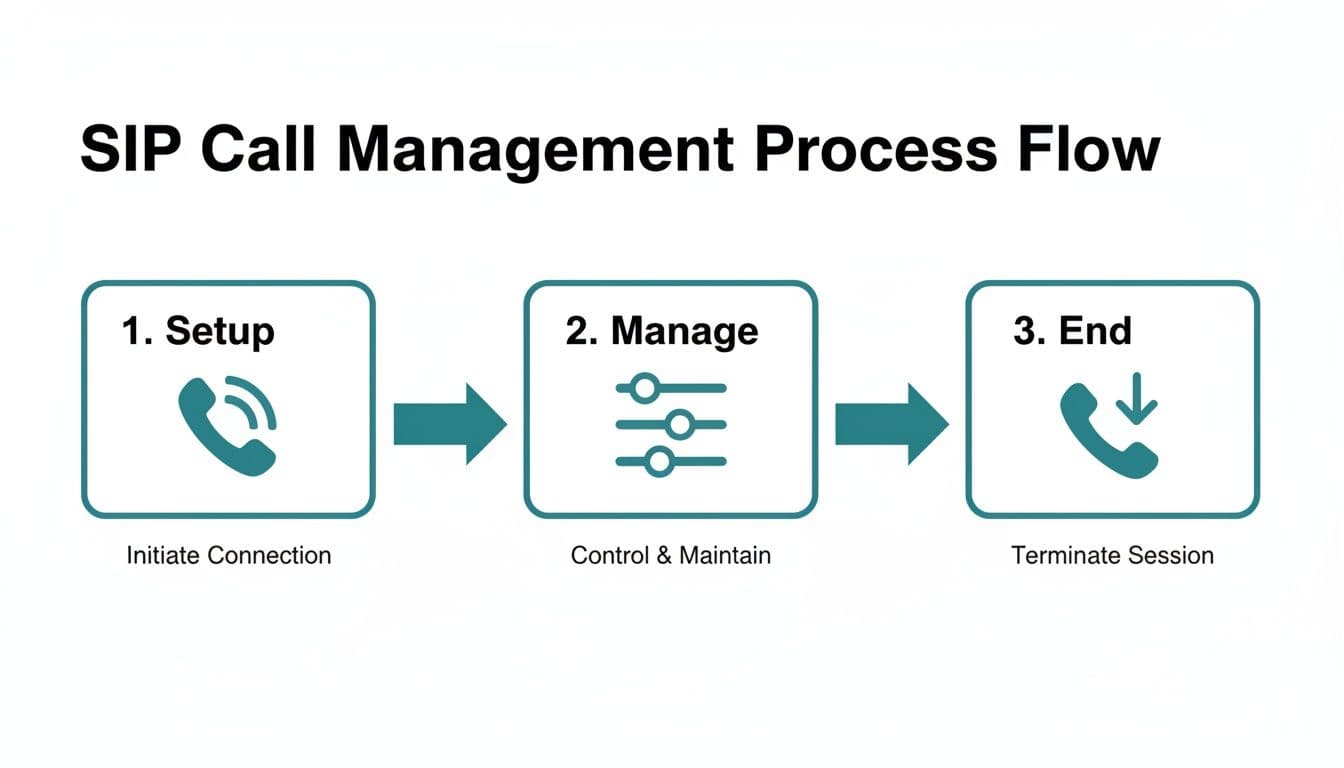
It's this structured, methodical process that ensures every call is properly set up, managed from start to finish, and ended correctly, giving us the reliable communication we depend on.
Securing Your Communications with SIP
While the SIP communication protocol is incredibly powerful, any data sent over the internet is a potential target. Think about it: unsecured calls can be intercepted, exposing sensitive business discussions and, more alarmingly, customer payment details. This opens the door to all sorts of risks, from simple call eavesdropping to toll fraud, where attackers hijack your system to make expensive calls on your dime.
For any organisation taking payments over the phone, locking down these conversations isn't just a good idea; it's a fundamental requirement. Without solid security measures, your call data—both the call setup messages and the audio itself—can be captured and exploited. This can lead to financial loss, serious damage to your reputation, and hefty compliance penalties.
Fortunately, the SIP framework comes with powerful tools to fight these threats. Modern VoIP systems are built to be secured through encryption, creating a private, protected tunnel for your communications that keeps prying eyes (and ears) out.
Encrypting the Signalling and Media
The secret to securing a SIP conversation is to encrypt two different parts of the call: the setup messages and the actual audio stream. It's a two-pronged approach that ensures protection from start to finish.
Transport Layer Security (TLS) — This is the very same encryption standard that secures websites—you know it as the 'S' in HTTPS in your browser's address bar. For SIP, TLS encrypts the signalling messages like INVITE, ACK, and BYE. It makes sure that the call details—who is calling whom, for how long—are kept confidential and can't be messed with while in transit. When you see SIPS (SIP Secure), it simply means that the SIP traffic must be sent over a TLS-encrypted channel.
Secure Real-time Transport Protocol (SRTP) — Once the call is connected, SRTP steps in. Its job is to encrypt the actual RTP media stream, which is the voice or video data of your conversation. This is what stops anyone from listening in on the call itself, ensuring the content of your discussion stays private.
By combining TLS for the signalling and SRTP for the media, you create a fully protected communication channel. This dual-layer protection is the standard approach for securing VoIP and a important first step toward building a secure environment for phone-based transactions.
Security Is a Foundation, Not the Final Step
Putting TLS and SRTP in place is a vital security measure that protects your data as it travels across the network. However, it's really important to understand that encryption alone doesn't make a payment process fully PCI-DSS compliant. While it's great at preventing eavesdropping, it doesn't stop sensitive card data from entering your internal systems, like your call recordings or your agents' desktops.
This is exactly why you need specialised solutions to handle payment card information securely during a live call. Encryption protects the conversation from outside threats, but technologies like DTMF masking are needed to shield the data from internal exposure points. If you want to dive deeper into this, have a look at our guide on understanding DTMF masking technology.
Think of a secure SIP foundation as the critical starting point on which these more advanced compliance solutions are built.
Understanding SIP Trunking and Session Border Controllers
To connect your internal phone system to the outside world, you need a bridge to the global telephone network. Not long ago, this meant paying for physical ISDN or PSTN lines, but that technology is quickly fading into the past. Today's digital equivalent is SIP Trunking, which cleverly uses your internet connection to create virtual phone lines.
Think of a SIP trunk as a digital pipeline that replaces dozens of old-school copper wires. You're no longer limited by physical hardware. Instead, you can add or remove phone lines on the fly, instantly scaling your capacity to handle call volume spikes during busy seasons or after a big marketing campaign. For any contact centre, that kind of agility matters.
SIP also underpins UCaaS platforms that bundle voice, messaging and video into a single subscription.
This shift to IP-based comms isn't just about being more flexible; it's also about saving money. In the UK, businesses making the switch from the old PSTN network have reported average cost savings of 40% to 60%. With BT planning to shut down the old network completely by 2027, every organisation still using analogue lines has to migrate to something like SIP trunking just to keep the phones ringing. You can find out more about how UK businesses benefit from SIP trunking.
Modern browser-based call stacks also lean on WebRTC to carry audio directly between endpoints without installing plugins.
The Role of the Session Border Controller
So, SIP trunking gives you the connection, but you still need a gatekeeper to manage and secure it. This is where a Session Border Controller (SBC) steps in. An SBC is a purpose-built device or piece of software that sits right at the edge—or "border"—of your network, managing every single voice call that flows in and out.
Think of an SBC as a smart, multilingual security guard for your voice network. It inspects every call, makes sure it's safe, translates between different systems when needed, and directs traffic to ensure every conversation is clear and secure.
Without an SBC, your phone system would be wide open to the public internet, leaving you vulnerable to common attacks like toll fraud and Denial-of-Service (DoS) attacks. That's why an SBC is a non-negotiable part of any serious business telephony setup that relies on the sip communication protocol.
Core Functions of an SBC
An SBC is the unsung hero of your VoIP system, juggling several critical jobs that are vital for security, quality, and making sure everything just works.
- Security — First and foremost, it acts as a voice-aware firewall. It cleverly hides your internal network layout and shields you from malicious attacks.
- Interoperability — It's a translator, smoothing out the differences between various "dialects" of SIP and audio codecs. This ensures calls connect successfully between your system and your provider's network, no matter what tech they're using.
- Quality of Service (QoS) — The SBC can prioritise voice traffic over other data on your network. This simple act helps eliminate the jitter and packet loss that cause choppy, poor-quality audio.
- NAT Traversal — It's an expert at navigating the tricky Network Address Translation (NAT) and firewall issues that often block SIP traffic, ensuring your calls connect reliably every time.
Achieving PCI Compliance with SIP and Secure Payments
Here's a common misconception: if your SIP calls are encrypted with TLS and SRTP, you're all set for PCI DSS compliance. Not quite. While these protocols are brilliant at stopping outsiders from listening in, they don't solve the core compliance challenge.
Encryption protects data in transit, but it can't stop sensitive card details from entering your business environment in the first place. Think about it—that data still travels through your agent's headset, gets stored in your call recordings, and shows up in your network logs. Each one is a potential point of exposure.
This is where theory hits a practical wall. To get truly compliant, you need a specialised layer that works with your SIP telephony. This is exactly where a solution like Paytia's Secureflow comes in, bridging the gap between a secure conversation and a secure payment.
The goal isn't just to protect the data, but to prevent it from ever touching your systems at all. This is a process known as "descoping".
How Secureflow Integrates with Your SIP Telephony
Picture this: an agent is on a call, and the customer needs to pay. Instead of the customer reading their card number out loud for the agent to hear and type, Secureflow steps in to manage just the payment part of the conversation.
It carves out a completely secure payment channel within the live call, using a couple of clever features:
- DTMF Suppression and Masking — The customer uses their phone's keypad to enter their card details. Secureflow intercepts these DTMF tones, masks them so the agent only hears a flat, unrecognisable sound, and sends the data on its way. The sensitive information is completely shielded.
- Channel Separation — The payment details travel directly from the customer to the payment gateway through Paytia's secure, PCI-DSS Level 1 certified environment. Your internal network, call recording systems, and the agent's computer are completely bypassed.
From the agent's perspective, the process is straightforward. They stay on the line to help the customer, but they are never exposed to the raw card numbers. This changes your compliance picture.
By making sure Primary Account Numbers (PAN) and Card Verification Codes (CVC) never even enter your infrastructure, you can slash your PCI-DSS assessment scope by up to 95%. This doesn't just bolt on more security; it dramatically cuts the cost and headache of staying compliant.
The momentum behind the sip communication protocol is clear. In the UK, the SIP Trunking market is growing fast, with call centres making up a huge 40% market share. This perfectly illustrates why integrated, secure payment solutions are no longer a 'nice-to-have' but a core business need. You can find more detail on the strategic importance of SIP in Europe's telecom evolution.
SIP Security vs Paytia Secureflow for PCI Compliance
To see how these layers work together, let's compare what standard SIP security provides versus the specialised enhancements needed for PCI DSS compliance.
| Security Layer | Standard SIP Security (TLS/SRTP) | Paytia Secureflow Enhancement | PCI-DSS Compliance Impact |
|---|---|---|---|
| Data in Transit | Encrypts the call audio between endpoints to prevent external eavesdropping. | Operates within the encrypted SIP call, adding a second layer of protection specifically for payment data. | Both layers work together to satisfy requirements for protecting data transmission over open networks. |
| Agent Exposure | Does not prevent the agent from hearing or seeing sensitive card data. | Uses DTMF masking to ensure agents never hear or handle raw card numbers. | Removes the agent and their workstation from the scope of a PCI DSS audit. |
| System Exposure | Card data is processed by and stored in internal systems (e.g., call recorders, CRM). | Reroutes payment data directly to the payment gateway, bypassing all internal systems. | Massively reduces the number of systems in scope for PCI DSS, simplifying audits and lowering costs. |
| Call Recordings | Card details are captured in call recordings, creating a major compliance risk. | Payment portion of the call contains only masked tones, making recordings inherently safe and compliant. | Eliminates the need for expensive and unreliable pause-and-resume recording systems. |
This table shows that while SIP security is an essential foundation, it's the specialised payment handling from Secureflow that truly solves the PCI DSS puzzle for contact centres.
This approach gives you a clear, practical path to securing your payment channels without inheriting all the associated risks. As you get ready for evolving standards, our guide on telephone payment requirements for PCI DSS 4.0 is a great next step.
Your Top SIP Protocol Questions, Answered
Getting your head around how SIP actually works is one thing, but putting it into practice often brings up a whole new set of questions. Let's tackle some of the most common queries we hear, especially from contact centres looking to modernise their telephony.
What Is the Difference Between SIP and VoIP?
This is easily the most common point of confusion, but the answer is surprisingly simple.
Think of VoIP (Voice over Internet Protocol) as the big idea – the general concept of making phone calls using an internet connection instead of old-school phone lines. It's the 'what'.
SIP (Session Initiation Protocol), on the other hand, is one of the key technologies that makes VoIP happen. It's the 'how'. SIP is the signalling protocol that does all the heavy lifting behind the scenes: setting up the call, managing it while you're talking, and then tearing it down when you hang up. While SIP is the engine for most modern VoIP systems, VoIP is the name for the entire category of technology.
Can I Keep My Existing Phone Numbers with SIP Trunking?
Yes, absolutely. There's no need to abandon the phone numbers your customers have known and used for years. The process of moving your existing numbers from a traditional carrier to your new SIP trunking provider is called "porting."
It's a standard, well-trodden path here in the UK. Your new provider will handle all the technical and admin work to transfer your numbers across, ensuring there's no disruption to your business. From your customers' perspective, nothing changes at all; they just keep dialling the same number to get through to you.
Keeping your phone numbers is a core benefit of migrating to SIP. It eliminates the friction of updating contact details and preserves the brand recognition you've built over the years, making the switch to a more modern telephony infrastructure much smoother.
Does Using SIP Automatically Make My Phone Payments PCI Compliant?
No, and this is a critical point for any business that takes card payments. Using SIP with strong encryption like TLS and SRTP is a vital security step, but it doesn't get you to PCI compliance on its own.
Encryption is brilliant at protecting call data from being snooped on while it's flying across the network. What it doesn't do is stop sensitive card details from entering your internal environment in the first place—your agent's headset, your call recording platform, your network logs. To be truly PCI compliant, you have to prevent that card data from ever touching your systems.
This is precisely why you need a dedicated secure payment solution. It works alongside your SIP telephony to intercept and isolate payment data, making sure it never enters your environment and dramatically shrinking your PCI DSS scope.
What Are the Main Challenges When Implementing SIP?
The most common hurdles usually boil down to two things: network quality and security setup. Since SIP calls live and die by the quality of your internet connection, any network wobble can directly impact call quality.
Here's what businesses typically run into:
- Network Performance — Issues like high latency (delay), jitter (wobbly, inconsistent delay), and packet loss are the enemies of clear audio. They lead to choppy conversations and dropped calls. A solid, high-quality internet connection is non-negotiable.
- Firewall and NAT Traversal — Firewalls and Network Address Translation (NAT) are notorious for misinterpreting SIP traffic and blocking it, stopping calls from connecting. This is one of the main reasons a Session Border Controller (SBC) is considered the right approach—it's purpose-built to navigate these exact problems.
The best way to sidestep these headaches is to partner with an experienced SIP provider. They can assess your network readiness and ensure everything is configured securely and reliably right from the start.
Ready to bridge the gap between your SIP telephony and PCI compliance? Paytia's Secureflow platform integrates with your existing systems, removing sensitive payment data from your environment and slashing your PCI DSS scope. Discover how to secure your phone payments and protect your customers today.