
Your Complete Guide to the IVR Interactive Voice Response System
Get Secure Payment Solutions
Learn how Paytia can help secure your payment processing.
You’ve almost certainly used one, even if you didn’t know its name. An Interactive Voice Response (IVR) system is the automated voice that greets you when you phone a company, acting as a digital receptionist to guide you to the right place. It interacts with you through your voice or the keypad on your phone, gathering information to route your call or even solve your query on the spot.
What Is an Interactive Voice Response (IVR) System?
Think about the last time you called your bank. Instead of getting a busy tone or waiting endlessly for an operator, a calm voice probably greeted you with a clear menu: "Press one for your account balance, press two for our opening hours, or say 'speak to an advisor'." That helpful, automated gatekeeper is an IVR system.
At its heart, an IVR is the link between your customers and your company's internal systems. It uses clever technology to understand what a caller wants and respond accordingly. It's like a smart sorting office for phone calls, making sure every caller finds the right information or gets to the right person as quickly as possible.
From Simple Menus to Smart Conversations
The first IVR systems were pretty basic. They worked using dual-tone multi-frequency (DTMF) signals—those are the beeps you hear when you press numbers on your phone. You’d navigate a series of menus by pressing keys, which could sometimes feel a bit rigid and frustrating.
Thankfully, the technology has come a long way. Today's IVR systems are packed with advanced features that make the experience much smoother and more natural. Key developments include:
- Speech Recognition: This lets you use your voice to navigate. Instead of hunting for the right key, you can just say, "I want to pay my bill," and the system understands.
- Text-to-Speech (TTS): This tech allows the system to read out dynamic information from a database, like your current account balance or the status of a recent order.
- Artificial Intelligence (AI): AI has made modern IVRs truly conversational. They can understand the intent behind what you're saying, handle more complex questions, and even learn from past calls to get better over time.
A well-designed IVR is far more than a call-routing machine; it's a powerful self-service tool. It gives your customers 24/7 access to information and common services, taking a huge weight off your human agents.
This frees up your team to focus on the more complicated, high-value customer problems where a human touch really matters. By automating the routine stuff, an IVR not only helps manage costs but also boosts efficiency and keeps customers happy. It works around the clock, offering a consistent and professional experience on every single call.
How an IVR Call Flow Actually Works
Let’s pull back the curtain and see what’s really going on when a customer calls an IVR system. The best way to understand it is to follow a typical customer journey from the moment they pick up the phone.
Imagine a customer, Sarah, who needs to call her bank about a recent transaction. The path her call takes isn't random; it follows a pre-designed script called a call flow. Think of it as a digital roadmap, carefully planned to get her from A to B as quickly and painlessly as possible. This isn't just a simple "press one for this, press two for that" menu. It's a dynamic, interactive process designed to figure out who she is, what she needs, and how to solve her problem.
Every prompt is a decision point, guiding Sarah towards either a self-service solution or the right human agent.
This diagram gives you a bird's-eye view of that journey, from the initial ring to a successful outcome.
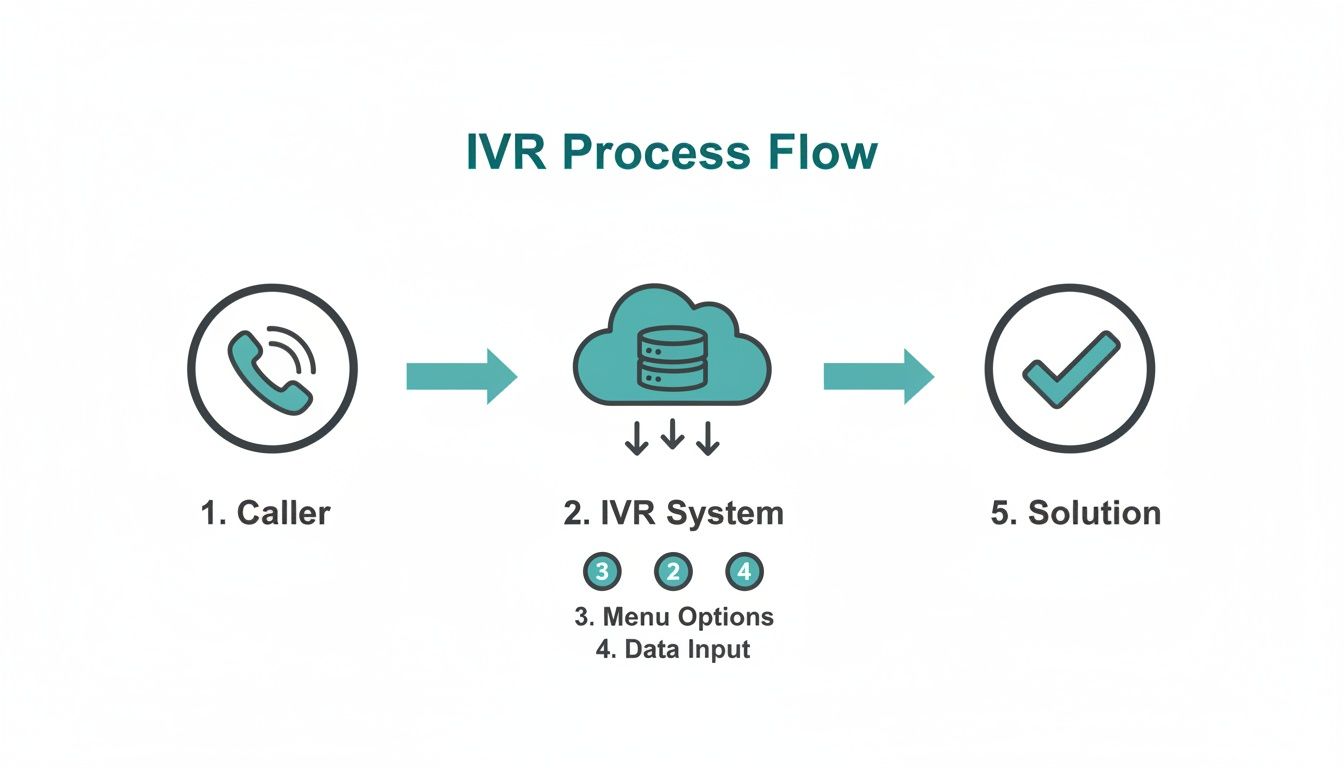
As you can see, the IVR is the central hub, interpreting what the customer wants and pulling information from other systems to deliver answers without making them wait.
The Initial Connection and Authentication
The second Sarah’s call connects, the IVR gets to work. It starts with a friendly, pre-recorded greeting that sets a professional tone and reinforces the brand's voice.
Next up is the main menu. For a bank, it might sound like this: "Press 1 for account services, Press 2 for loans, Press 3 to report a lost or stolen card." Sarah needs to check her balance, so she presses '1'.
That tap on her keypad sends a DTMF (dual-tone multi-frequency) signal—the familiar beeps you hear—which the IVR instantly understands. But before it can give out any sensitive account details, it has to be sure it's really her. The system will ask for her account number and maybe a PIN or date of birth. This is the critical first line of defence for security.
Input Validation and Information Retrieval
Once Sarah types in her details, the IVR doesn’t just take her word for it. It immediately pings the bank’s backend systems, like its Customer Relationship Management (CRM) database, to check if the information is correct.
If everything matches up, she's authenticated. Now, the IVR can securely access her account. Using Text-to-Speech (TTS) technology, it converts the raw data from the database into a natural-sounding voice, telling Sarah her current balance and reading out her latest transactions.
A well-designed call flow feels less like interacting with a machine and more like a guided conversation. The goal is to make the process so intuitive that the customer barely notices the technology working behind the scenes.
This seamless integration is what makes self-service so powerful. For a deeper dive into more complex scenarios, you can explore our complete guide on the IVR payment flow.
Routing to the Right Destination
But what if Sarah had a bigger problem, like a transaction she didn't recognise? After being authenticated, she might hear an option like, "To speak with an advisor, press 0."
This is where the IVR's routing smarts come into play. Because she initially selected 'account services', the system knows exactly which team to send her to. It directs her call to a specific group of agents trained to handle those types of queries. This is called skills-based routing, and it's a game-changer.
Instead of being passed around from person to person, Sarah gets straight to someone who can actually help. This dramatically increases the chances of First Contact Resolution (FCR) and turns a potentially frustrating experience into a satisfying one.
Securing Telephone Payments with IVR Technology
Taking card payments over the phone is a tightrope walk for any business. The moment a customer speaks their card number out loud to an agent, a whole host of security risks and compliance headaches spring to life. This creates a vulnerable situation for both the customer and your organisation. This is precisely where a specialised IVR interactive voice response system becomes one of your most important security tools.
Without a secure IVR, sensitive payment information can be easily overheard, accidentally captured in call recordings, or jotted down on a sticky note. Any of these scenarios creates a significant compliance nightmare. The Payment Card Industry Data Security Standard (PCI-DSS) has very strict rules for handling this kind of data, and failing to comply can result in hefty fines and reputational damage.
How DTMF Masking Shields Sensitive Data
A secure payment IVR tackles these risks head-on with a clever bit of tech called DTMF (Dual-Tone Multi-Frequency) masking, sometimes known as suppression. It’s a beautifully simple concept that keeps sensitive card details completely separate from your contact centre environment.
Let's walk through it. A customer is on the phone with an agent and needs to pay for something. Instead of verbally sharing their card details, the agent directs them to a secure IVR payment module. The customer then simply uses their phone's keypad to punch in their card number, expiry date, and CVC.
Here’s where the magic happens:
- The agent stays on the line to help if needed, but they only hear flat, monotonous beeps—not the distinct tones that correspond to each number.
- The IVR system securely captures these keypad entries and sends them straight to the payment gateway for processing.
- Crucially, these tones are also blocked from the call recording, meaning no sensitive data is ever stored.
Think of it like sending an encrypted message that only the payment gateway can decipher. The agent is there to steer the conversation, but the critical payment data completely bypasses them and all your internal systems.
What Is Tokenization in IVR Payments
Another essential layer of security that a modern IVR interactive voice response system provides is tokenization. The easiest way to understand a token is to think of it as a secure, digital stand-in for a customer’s actual card details. It’s like a unique reference number.
After the payment gateway processes the transaction, it sends back this non-sensitive token, not the full card number. This token is just a randomly generated string of characters that has no real value if it were ever intercepted.
By swapping sensitive card data for a secure token, your business can safely store it for future use—like for recurring bills or repeat customers—without ever holding the actual card details. This dramatically lowers your risk profile and makes PCI-DSS compliance far simpler.
This token can't be reverse-engineered to reveal the original card number, making it an incredibly powerful tool for building trust and making future payments both seamless and secure.
To better understand the differences, let's compare the old way of doing things with a modern, secure approach.
Comparing Secure vs Non-Secure IVR Payment Methods
The table below highlights the stark contrast between handling payments in an unsecured environment and using a dedicated, secure IVR solution.
| Feature | Traditional Phone Payments | Secure IVR Payments (e.g., Paytia Secureflow) |
|---|---|---|
| Data Exposure | High. Agents hear and may see card numbers. | Zero. Agents never hear or see cardholder data. |
| Call Recording Risk | High risk of recording sensitive data, violating PCI-DSS. | Eliminated. DTMF tones are masked, so nothing is captured in recordings. |
| PCI-DSS Scope | Full scope. All systems, agents, and processes are included. | Drastically reduced. The payment environment is "de-scoped" from your contact centre. |
| Data Storage | Risky. Often involves manual entry or insecure storage methods. | Secure. Tokenization allows for safe storage of payment credentials for future use without storing card data. |
| Customer Trust | Lower. Customers may be hesitant to share details verbally. | Higher. Customers feel more secure entering details directly without a human intermediary. |
| Agent Responsibility | High. Agents are responsible for handling sensitive data. | Low. Agents are removed from handling sensitive data, reducing human error and internal fraud risk. |
As you can see, the benefits of adopting a secure system are clear, moving from a position of high risk and complexity to one of enhanced security and simplified compliance.
Reducing Your PCI-DSS Scope
By combining DTMF masking and tokenization, a secure IVR platform like Paytia's Secureflow effectively removes your contact centre from the flow of sensitive payment data. In industry terms, this is called "de-scoping" your environment from PCI-DSS requirements.
In the UK, the push for stronger PCI-DSS compliance has accelerated the adoption of these security technologies. The market for fraud detection tools, for instance, is projected to grow significantly as businesses shore up their defences. Solutions like Secureflow are a perfect fit for this trend, as DTMF suppression and tokenization keep cardholder data out of call recordings and business systems. This alone can reduce PCI scope by up to 90-95%. It not only cuts compliance costs but also boosts customer confidence, which is vital in regulated sectors. You can get a deeper understanding by exploring these IVR payment processing insights.
When the time comes for an audit, you can confidently show that no cardholder data is ever seen, heard, or stored within your infrastructure. This massively reduces the time, cost, and complexity of achieving and maintaining PCI-DSS compliance. It frees your team to focus on what they do best: delivering fantastic customer service, not navigating a maze of security protocols.
Integrating Your IVR with Core Business Systems
An IVR interactive voice response system really starts to show its worth when it stops working in isolation. Think of a standalone IVR as a receptionist who can greet visitors but doesn't know who they are or why they're there. Now, imagine that same receptionist connected to all your business tools—they instantly become a knowledgeable concierge, anticipating needs and creating a truly seamless experience.
Integration is what turns your IVR from a simple call-routing machine into the intelligent hub of your customer service operation. By plugging it into your core systems, you create a powerful ecosystem where data flows freely, arming both your automated menus and your human agents with the context they need.
This synergy is the key to unlocking real operational efficiency and, more importantly, a far better customer journey. The goal is to build a single, unified view of every interaction, ensuring consistency no matter how a customer gets in touch.
Connecting IVR with PBX and VoIP Systems
The most fundamental integration is with your main telephone system, whether that’s a traditional Private Branch Exchange (PBX) or a modern Voice over IP (VoIP) network. This connection is the bedrock of intelligent call management. It lets the IVR do so much more than just answer the phone.
With a properly linked system, you can deploy sophisticated call routing strategies based on real-time data. For instance, the IVR can check an agent's status in the PBX or VoIP system and only route calls to people who are actually available, which dramatically cuts down on hold times. It can also manage call queues more effectively during busy periods, perhaps by offering an automated callback to stop customers from getting frustrated.
This tight coupling ensures every call is handled efficiently from the very first second, setting the stage for a positive interaction.
Linking with Contact Centre Platforms
For any business with a dedicated contact centre, integrating the IVR with the central platform is a must. This connection creates a fluid handover between self-service and agent assistance, which is absolutely critical for resolving complex issues.
Picture this: a customer tries to sort out a problem using the IVR but eventually needs to speak to a person. A connected system makes a "warm transfer" possible. All the information the customer has already punched in—like their account number and the reason for their call—is passed straight to the agent's screen as the call connects.
A seamless transfer from IVR to a live agent is the difference between a customer saying, "Finally, a person!" and "Ugh, I have to start all over again?" This one capability has a massive impact on customer satisfaction and First Contact Resolution rates.
It completely removes the need for customers to repeat themselves, which is easily one of the biggest bugbears in customer service. The agent gets instant context, allowing them to dive straight into solving the problem instead of wasting time gathering basic information.
The Power of CRM Integration
This is where things get really clever. Connecting your IVR interactive voice response system with your Customer Relationship Management (CRM) platform is probably the most powerful integration you can make. It’s how you start delivering truly personalised and proactive service.
When a call comes in, the IVR can use the caller's phone number to look them up in the CRM in a split second. This opens up a world of possibilities for creating a more tailored experience:
- Personalised Greetings: The IVR can greet returning customers by name ("Hello, Sarah, welcome back!"), making the whole interaction feel less robotic and more welcoming.
- Anticipatory Service: If the CRM shows the customer has a recent order or an open support ticket, the IVR can proactively offer relevant options. Think: "Are you calling about your recent order ending in 456?"
- Automatic Data Logging: Once the call is over, the IVR can automatically create a record in the CRM, logging the call's duration, its outcome, and any actions that were taken.
This creates a complete, 360-degree view of the customer journey, making sure every person in your team has the full story. For businesses wanting to extend this connectivity even further, understanding how a payment gateway API integration works is the logical next step. By linking these systems together, you build a smarter, more responsive organisation that genuinely values your customers' time.
Choosing Your Model: Self-Service vs. Agent-Assisted IVR
So, you've decided an IVR is the right move. That's a great first step, but now for the big question: what kind of IVR? They aren't all built the same, and the best fit for you boils down to your business, your customers, and your security needs. The two main flavours are fully automated self-service and the hybrid agent-assisted model.
Getting the difference between these two is crucial. One is all about automating routine tasks, while the other cleverly blends a human touch with secure technology for those trickier, more sensitive interactions. Let’s unpack them to see which one clicks with your goals.
The Fully Automated Self-Service Model
Think of a self-service IVR as your most reliable employee—one who works 24/7 without ever needing a coffee break. It’s designed to handle a customer’s entire query from start to finish with zero human hand-holding. This is perfect for the straightforward, high-volume tasks that customers want to get done quickly.
This model shines when you’re dealing with simple requests that don't need a deep conversation or a human's emotional intuition. The name of the game here is speed and convenience, letting customers get what they need without sitting in a queue.
It’s a natural fit for things like:
- Checking an account balance or the status of a delivery.
- Paying a standard bill.
- Renewing a subscription or an insurance policy.
- Finding out business hours or branch locations.
A self-service IVR's superpower is its ability to take a huge number of simple, repetitive calls off the plates of your live agents. This frees your team up to focus on the more complex, high-value conversations where their expertise really makes a difference.
This approach is incredibly cost-effective and can give your operational efficiency a massive boost, especially if you’re fielding thousands of similar calls every day.
The Agent-Assisted Secure IVR Model
The agent-assisted model gives you the best of both worlds: a genuine human connection backed by rock-solid automated security. In this setup, the customer speaks directly with an agent who steers the conversation, offers support, and builds that all-important rapport. But when it comes time to handle the sensitive stuff—like taking a payment—the magic happens.
Instead of asking the customer to read their card details aloud, the agent seamlessly passes them to a secure IVR payment system. The agent stays on the line, able to guide and reassure the customer, but the card numbers are entered using the phone's keypad. These DTMF tones are completely hidden from the agent and kept out of the call recording, keeping the data safe and your business firmly within PCI-DSS compliance.
This hybrid approach is ideal for:
- Complex Transactions: Perfect for when a payment is part of a bigger discussion, like settling an overdue account or finalising a bespoke sales order.
- High-Value Sales: Essential for situations where building trust through conversation is a key part of the sale before asking for payment.
- Customer Support Scenarios: When a customer needs reassurance or has questions that an agent needs to answer before they feel comfortable paying.
The agent-assisted model ensures that even the most critical part of the call is handled securely, taking your agents and call recordings completely out of the scope of PCI-DSS. By blending human expertise with smart automation, you deliver an experience that’s not just efficient, but secure and reassuring too.
Choosing the right IVR model is a strategic decision. To help you weigh the options, here’s a direct comparison of what each model brings to the table for your business and your customers.
Self-Service IVR vs Agent-Assisted IVR: A Feature Comparison
| Aspect | Fully Automated Self-Service IVR | Agent-Assisted Secure IVR |
|---|---|---|
| Primary Goal | Efficiency & cost reduction for high-volume, simple tasks. | Securely handle sensitive data within a human-led conversation. |
| Customer Interaction | Fully automated. No live agent involvement. | A blend of live agent conversation and secure automated input. |
| Best For | Routine enquiries, balance checks, status updates, simple bill payments. | Complex sales, debt collection, service payments, troubleshooting. |
| Security Focus | Securing the entire automated interaction from end-to-end. | Isolating the payment capture process to de-scope agents & recordings. |
| PCI-DSS Scope | The entire IVR system and its connections are in scope. | Removes agents, desktops, and call recordings from PCI-DSS scope. |
| Agent's Role | N/A | Guides the customer, builds rapport, and handles the non-payment parts. |
| Availability | 24/7, offering round-the-clock service. | Limited to agent working hours. |
Ultimately, the choice isn't about which model is "better," but which one is better for you. Many businesses find that using a combination of both—self-service for the simple stuff and agent-assisted for everything else—provides the most complete and effective customer service strategy.
9 Best Practices for a Successful IVR Implementation
Getting an IVR interactive voice response system up and running is the easy part. The real challenge? Creating one that customers actually find helpful. A well-designed IVR acts like a friendly and efficient guide, while a poorly executed one feels like a frustrating, endless maze.
The aim should always be to build a system that genuinely improves the customer's experience and builds loyalty, not one that makes them want to hang up. Let’s move past the technical checklist and dig into the practical steps that make an IVR truly successful.
1. Design an Intuitive and Simple Menu
If there’s one golden rule in IVR design, it’s this: keep it simple. Nothing sends a caller’s blood pressure soaring faster than a long list of confusing options. A good menu should be logical and brief, ideally offering no more than four or five choices at each level.
Try to put yourself in your customer's shoes. Why are most people calling you? Put those common queries right at the top. For example, an insurance company should have options like "Make a claim" or "Check policy details" front and centre, long before less common requests.
2. Write Clear and Professional Scripts
Your IVR’s voice is your brand’s voice, at least for that caller. The scripts need to be clear, concise, and professional, completely free of internal jargon or overly technical language. When recording prompts, use a voice that sounds calm and natural—a robotic tone is an instant turn-off.
Keep your prompts short and direct. Instead of a long, meandering sentence, break instructions into smaller, easier-to-digest pieces. Think "To pay your bill, press one," not "If you would like to proceed with making a payment on your most recent invoice, please press the number one on your keypad now."
The single most important feature of a customer-friendly IVR is a clear, easy-to-find escape hatch. Always give callers a simple way to reach a live agent, like "Press zero at any time," so they never feel trapped in an automated loop.
This one small feature demonstrates that you value their time and are ready to offer human help when it’s needed.
3. Continuously Analyse and Improve
An IVR is never a "set it and forget it" project. To make it truly effective, you need to keep an eye on how it’s performing and be ready to make changes. Regularly dive into your call data to see how people are actually using the system.
Keep an eye out for tell-tale patterns:
- High drop-off rates: Where in the menu are callers giving up and hanging up? That's a sure sign of a frustrating bottleneck or a confusing prompt.
- Frequent transfers to agents: If one particular menu option almost always ends with the caller asking for a person, that self-service journey isn't working as intended.
Use these insights to make informed tweaks. By constantly spotting and fixing these friction points, you can refine your IVR interactive voice response system into a smoother, more efficient, and far more pleasant experience for everyone who calls.
Got Questions About IVR? We've Got Answers
Even after seeing what an IVR interactive voice response system can do, it's natural to have a few questions before you jump in. We hear the same queries time and again from businesses thinking about security, integration, and what their customers will actually think.
Let's clear up some of the most common questions.
How Does an IVR System Actually Help with PCI DSS Compliance?
Think of a secure IVR as a protective bubble for your customer’s sensitive payment information. It improves your PCI DSS compliance by making sure card details never even touch your business environment.
It uses a clever technology called DTMF masking. When a customer types their card number on their keypad, the IVR captures those tones directly and sends them straight to the payment gateway. Your agents never see, hear, or handle that data. This takes your contact centre and its call recordings completely out of the scope of PCI DSS, which makes audits simpler and dramatically cuts down on compliance costs.
The real win here is removing the risk entirely. You're creating a secure, isolated payment channel, effectively handing over the compliance headache to a certified platform built specifically for the job.
Can We Connect an IVR to Our Existing CRM?
Yes, absolutely. Modern IVR solutions are designed to play nicely with other systems, and they can be connected to just about any major CRM platform out there. This connection is what elevates an IVR from a basic call-routing tool to a core part of your customer service engine.
Once integrated, your IVR can do some really smart things, like:
- Look up customer details to greet them by name or offer menu options based on their recent activity.
- Log call information back into the CRM, giving you a complete picture of every customer interaction.
It’s all about creating a smoother workflow for your team and a more joined-up, personal experience for your callers.
Won't Our Customers Just Get Annoyed with an Automated System?
Customer frustration isn't really a technology problem—it's a design problem. An IVR that sends people around in circles with confusing menus and no clear way to talk to a person is guaranteed to cause irritation.
But a well-thought-out IVR interactive voice response system genuinely makes customers happier. It offers them a quick, 24/7 way to handle simple things like checking an account balance or paying a bill, without having to queue for an agent. The secret is to always give them an easy and obvious option to speak to a human. That way, they feel in control, not trapped in an automated maze.
Ready to tighten up security and make your payment process smoother? Paytia offers a powerful and compliant IVR solution designed to take your contact centre out of PCI-DSS scope while building customer trust. Discover how our Secureflow platform can be shaped to fit your business at https://www.paytia.com.
Ready to Get Started?
Contact Paytia to learn how we can help secure your payment processing.