
Quick summary
Cloud contact centre solutions trade rigid on-premise kit for browser-based platforms billed monthly. For UK organisations taking card payments, the real prize isn't the CCaaS itself — it's pairing it with DTMF masking or secure payment links so cardholder data never touches your platform, agents, or recordings. That single architectural choice cuts your PCI DSS v4.0.1 scope by up to 95%.
Last updated: 29 May 2026
US reader? See the US version of this guide with US-specific compliance detail (TCPA, NYDFS, CCPA, FedNow, US PCI scope guidance).
Cloud contact centre solutions — known as cloud contact center solutions in US English — are software suites that manage every way a customer reaches you: calls, emails, live chat, social, WhatsApp, you name it. Hosted on the public internet rather than on a server in your basement, the modern cloud contact centre is a subscription-based alternative to the old way of doing things. If you're still weighing whether you need a full cloud stack or just a better IVR layer (and wondering how digital wallets fit the picture), our guide on contact centre IVR is a good starting point.
This modern approach is the backbone for any business that needs to support a remote or hybrid workforce, and it pairs naturally with self-service payment flows — see our IVR for contact centres walkthrough. It frees your agents from being tied to a specific office and lets them work from anywhere with a decent broadband connection.
What Are Cloud Contact Centre Solutions?#
Let's cut through the jargon. What does a "cloud contact centre" actually feel like in practice?
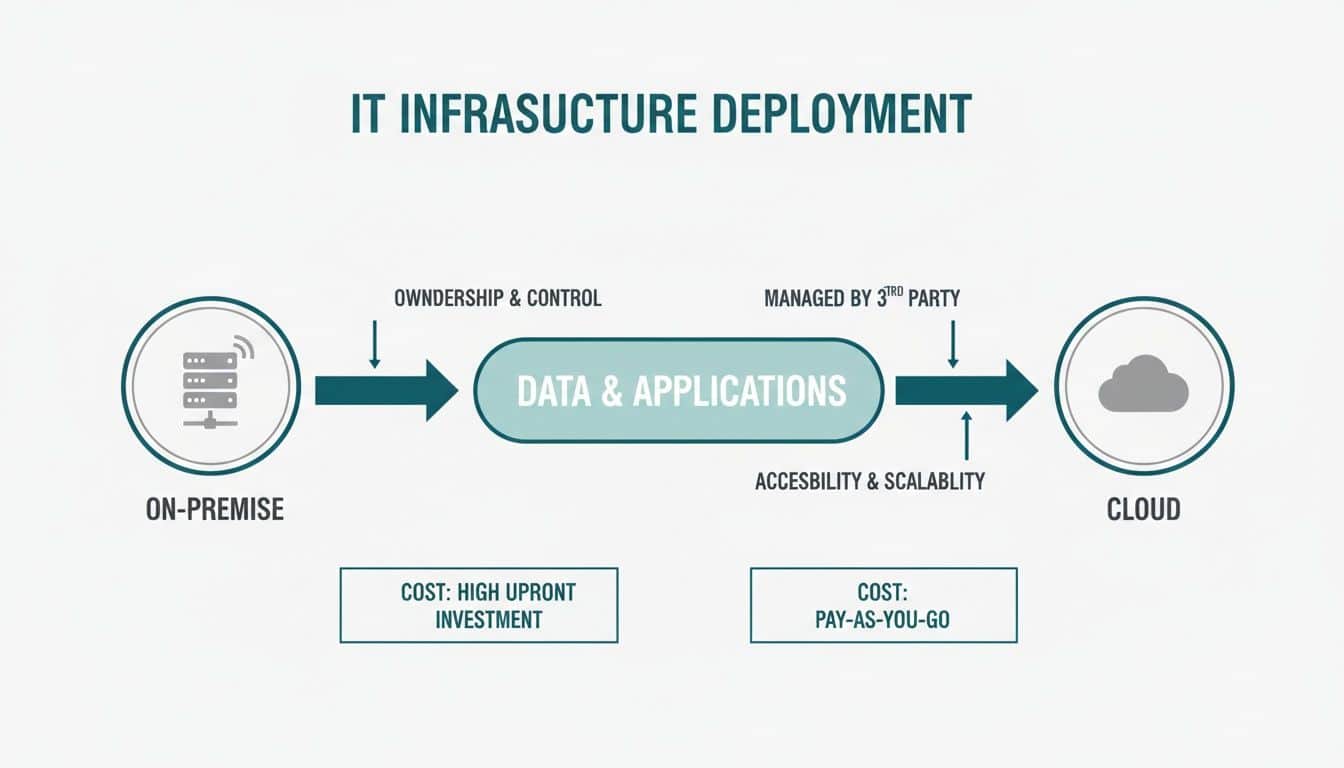
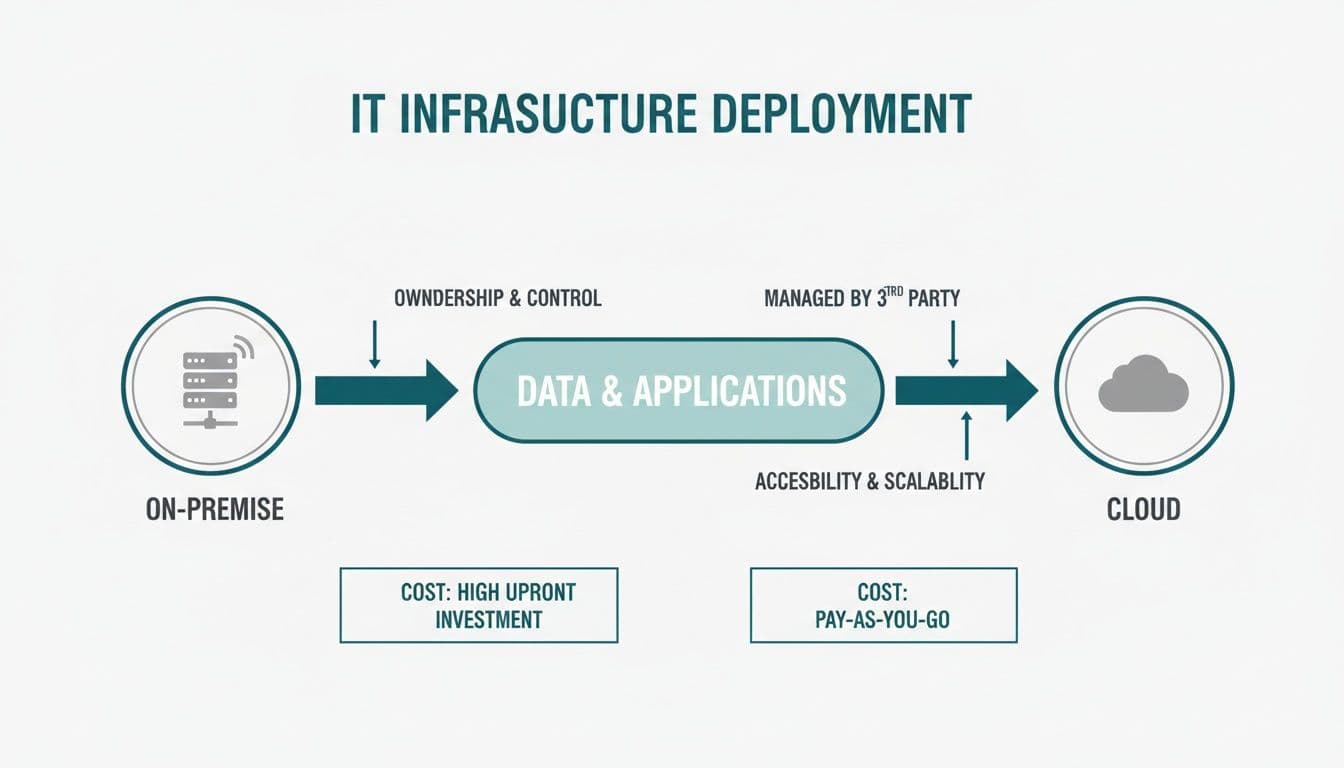
Think of a traditional, on-premise contact centre as a physical library. It's a powerful building, full of resources, but it's expensive to build and maintain, requires constant upkeep, and everyone has to physically be there to use it. It's rigid.
A cloud solution is more like a streaming subscription. It's instantly accessible from any device with an internet connection, you can add or remove users on the fly, and the provider keeps adding features behind the scenes — usually fortnightly, sometimes weekly.
From Capital Expense to Operational Flexibility
This shift changes the economics of running a contact centre. You move away from a massive upfront capital investment (CapEx) for servers, software licences, and office space. Instead, you adopt a predictable, pay-as-you-go operational cost (OpEx) through a monthly or annual subscription.
For a UK business doing seasonal volume — a holiday letting agency in Cornwall, a tax adviser in March, an e-commerce brand around Black Friday — that flexibility is the whole point. You can spin up 30 extra seats in an afternoon and close them down again in January. Try doing that with an Avaya cabinet in a server room.
At its core, a cloud contact centre is simply a complete set of tools for managing customer conversations, hosted online instead of on servers humming away in your office. This model has become essential for supporting the remote and hybrid teams that UK businesses now rely on.
The UK Market Picture
The move to the cloud isn't new. UK organisations have been transitioning for the better part of a decade, but Covid accelerated everything — particularly in regulated sectors like financial services, insurance, and housing.
In the UK, a staggering 39% of contact centres had already moved their operations to the cloud by 2018. Looking ahead, 57% of them planned to fully transition within the following three years, placing the UK firmly at the front of this digital shift in Europe.
That trajectory has only steepened since. Today the conversation is rarely "should we move?" — it's "which platform, which integrations, and how do we handle payments without dragging our entire estate into PCI scope?"
On-Premise vs Cloud Contact Centre At a Glance
To make the differences clear, it helps to see them side-by-side. Here's a quick comparison of the old-school on-premise model versus a modern cloud contact centre solution.
| Aspect | On-Premise Contact Centre | Cloud Contact Centre Solution |
|---|---|---|
| Initial Cost | High upfront capital expenditure (CapEx) for hardware, software, and facilities. | Low to no upfront cost, with predictable monthly or annual subscription fees (OpEx). |
| Scalability | Rigid and slow. Adding or removing agents requires physical hardware changes. | Highly flexible and rapid. Scale agent numbers up or down instantly to meet demand. |
| Maintenance | Managed entirely by an in-house IT team, including updates, security, and repairs. | Handled by the provider, including all software updates, security patches, and maintenance. |
| Accessibility | Limited to a physical location, making remote work difficult and costly to implement. | Accessible from anywhere with an internet connection, ideal for remote and hybrid teams. |
| Updates | Requires manual updates and new software purchases to access new features. | Features are updated automatically and continuously by the provider at no extra cost. |
| Reliability | Dependent on in-house infrastructure, with business continuity resting on internal resources. | High uptime guaranteed by SLAs, with built-in redundancy and disaster recovery. |
Choosing a cloud-based model is about future-proofing your operations — resilience, financial predictability, and the technical agility you need to keep up with what modern customers expect.
Understanding Core Components and Deployment Models#
To really get what makes cloud contact centre solutions tick, you need to lift the bonnet. These platforms aren't one piece of software; they're a stack of interconnected components, all working together to create a smooth experience for customers and agents.
At the heart is the Automatic Call Distribution (ACD) system. This is the traffic controller for your operation. The ACD looks at every incoming query — call, chat, or email — and routes it to the best-suited agent based on rules you define: skills, language, queue priority, who's available, who's been idle longest.
Working in lockstep with the ACD is the Interactive Voice Response (IVR) system. A modern IVR is so much more than a clunky "press one for sales" menu. It's your automated front-line agent, capable of handling simple, everyday tasks like checking an account balance, confirming a delivery, or taking a payment via DTMF masking. This frees up your human agents to tackle the complex conversations that need a real person.
Optimising Your Most Valuable Asset
Beyond routing calls and messages, the better platforms include Workforce Optimisation (WFO) tools. This is a suite of features designed to manage, coach, and get the best out of your team. It typically includes:
- Quality Management — Tools that let you record calls and agent screens. Essential for reviewing performance, providing targeted feedback, and meeting compliance standards.
- Workforce Management (WFM) — Forecasting and scheduling software. It ensures you have the right number of agents logged in at the right times, preventing long queues and agent burnout.
- Performance Analytics — Dashboards covering key metrics like average handle time, first-call resolution, and customer satisfaction scores.
- Speech Analytics — Automated transcription and keyword spotting across 100% of calls, not the 2% your QA team can physically listen to.
Choosing Your Cloud Deployment Model
Just as important as what is in your solution is how it's deployed. "The cloud" isn't a one-size-fits-all concept. The right model for you depends on your needs for security, control, and scalability.
Public Cloud: A Shared, Scalable Resource
Think of the public cloud as renting a flat in a modern, professionally managed building. You get access to top-tier amenities — security, maintenance, utilities — without the expense of owning the building. It's cost-effective, highly scalable, and run by hyperscalers like AWS, Microsoft Azure, or Google Cloud. A fast-growing e-commerce brand or a multi-site insurance broker would find that agility invaluable.
Private Cloud: Your Dedicated Environment
A private cloud is like owning your own detached house. You have total control. You can customise it exactly how you want, and you're solely responsible for security and upkeep. This model offers the highest level of control, making it the choice for large UK financial institutions, NHS trusts, or government bodies with strict data residency rules.
Hybrid Cloud: The Pragmatic Middle
The hybrid model is like owning your house but still connecting to the grid for electricity and water. You keep your most sensitive data and critical applications on a private cloud while tapping into the public cloud's power for less sensitive tasks — development, sandbox environments, handling seasonal spikes.
This mix of control and flexibility is precisely why hybrid models are becoming so popular, particularly in regulated UK sectors. While public cloud adoption is still strong, the hybrid approach is growing at over 20% CAGR, driven by the need to balance data sovereignty with commercial agility.
This trend is a direct response to ever-changing data laws — UK GDPR, the Data Protection Act 2018, FCA Consumer Duty, and PCI DSS v4.0.1 obligations that took full effect on 31 March 2025. Many businesses report that adopting the right cloud strategy has cut compliance-related costs by up to 45%.
What Lives Where: A Realistic UK Split
In practice, here's how a typical UK regulated business splits the workload:
- Public cloud: the contact centre platform itself (Genesys, Five9, NICE CXone, Talkdesk, RingCentral, 8x8), workforce management, speech analytics, and analytics dashboards.
- Private cloud or on-prem: the core banking platform, the policy admin system, the patient records database.
- Specialist secure tenant: the payment capture flow itself — a separate, PCI DSS Level 1 environment that intercepts card data before it reaches the contact centre. That's the bit Paytia handles.
Want to see this working in your setup? Book a working-demo call — we'll wire up your actual phone system and show you a live capture.
Essential Features That Improve Customer Experience#
While the technical architecture of cloud contact centre solutions is impressive, it's the features built on top that really shape your customer conversations. These are the tools that let your agents do their best work, iron out clunky workflows, and create the kind of smooth experience people now expect.
These features all work together to build a single, unified view of the customer. Conversations flow naturally across channels without friction or annoying repetition. For your customers, it means they don't have to tell their story over and over every time they speak to someone new or switch from a web chat to a phone call.

Unifying the Journey with Omnichannel Routing
The days of siloed communication are gone. Omnichannel routing is arguably the most powerful feature of modern cloud platforms. It weaves all your touchpoints — voice, email, SMS, WhatsApp, social media, web chat — into a single, continuous conversation. Payments flow the same way — for the trade-offs between SMS-based flows and classic IVR capture, see SMS payments vs traditional IVR payments.
Imagine a customer starts a query on your website's chatbot. When things get too complex, they click a button to escalate to a live agent. That agent instantly gets the full chat history, letting them pick up exactly where it left off. No more "Can you please explain the problem from the beginning?"
This kind of continuity matters. Research shows customers will switch supplier after just one bad experience, and a disjointed, repetitive journey is a fast track to frustration.
Intelligent IVR and Self-Service
Modern Interactive Voice Response (IVR) systems are a world away from the infuriating, robotic menus we all used to hate. Powered by AI, today's intelligent IVRs can actually understand what a customer wants and handle a whole range of tasks on their own, acting as your first line of support.
These systems can take care of common queries entirely:
- Processing Payments — Securely taking card details to settle a bill, with DTMF masking so the digits never enter your platform.
- Booking Appointments — Checking calendars and scheduling services.
- Checking Order Status — Real-time delivery updates.
- Answering FAQs — Pulling answers straight from a knowledge base.
- Authenticating Callers — Voice biometrics or knowledge-based authentication before the call reaches an agent.
This automation frees up your human agents to focus on complex, emotionally charged conversations where their expertise makes a real difference.
Recordings for Quality and Compliance
Call and screen recording is a cornerstone for any serious contact centre. Its main job is quality assurance (QA) and agent training. Managers review interactions to give targeted feedback, spot coaching opportunities, and make sure service standards are being met.
Beyond training, recordings are vital for compliance and resolving disputes. They provide an undeniable record of what was said, which is essential in regulated industries like finance, insurance, and utilities to prove you're following the rules. In the UK, FCA-regulated firms must retain recordings for a minimum of six months under MiFID II, and longer under other obligations.
A well-run cloud contact centre doesn't just store data; it makes it useful. The ability to easily access, analyse, and learn from every customer interaction is what separates a good service operation from a great one.
Actionable Analytics and Reporting
You can't fix what you don't measure. Cloud contact centre solutions come with analytics dashboards that turn raw operational data into clear, practical information. These platforms track hundreds of metrics in real time, giving you a live view of performance.
Key performance indicators (KPIs) often include:
- First Contact Resolution (FCR) — The percentage of queries solved in one go.
- Average Handle Time (AHT) — How long an average customer interaction takes.
- Customer Satisfaction (CSAT) — Direct feedback scores from customers after an interaction.
- Net Promoter Score (NPS) — Loyalty and likelihood-to-recommend signal, usually surveyed monthly.
- Agent Utilisation — The amount of time agents are actively helping customers.
Most cloud platforms surface CSAT data in real time so supervisors can act the same day. Many now include sentiment analysis so supervisors can spot calls going sideways before they escalate.
APIs: The Universal Connectors
Application Programming Interfaces (APIs) are the connectors that let your contact centre plug into the rest of your business software. Think of APIs as universal adapters that allow different systems to talk to each other.
For example, an API can connect your contact centre to your CRM. When a call comes in, the agent's screen can automatically pop up with the caller's entire history, past purchases, and recent support tickets. This 360-degree view is vital for providing personalised, efficient service. To deliver consistently good service, understanding and implementing effective knowledge management practices is key.
Navigating Security and Compliance in the Cloud#
Moving your customer conversations to the cloud naturally puts security under the microscope. When you're handling sensitive information like payment details or personal data, solid security isn't a nice-to-have — it's the bedrock of your operation. Trust is the currency of customer relationships, and a single breach can shatter it.
The good news is that modern cloud contact centre solutions are built with security at their core. Reputable providers offer business-grade protection that often goes far beyond what most businesses could manage on their own. They pour millions into infrastructure, threat detection, and certifications to keep your data locked down.
Demystifying PCI DSS v4.0.1
For any organisation that takes card payments, the Payment Card Industry Data Security Standard (PCI DSS) is the rulebook. The current version is v4.0.1, with the future-dated requirements that distinguish v4 from v3.2.1 having become mandatory on 31 March 2025. v3.2.1 is fully retired. If your auditor or your CCaaS vendor is still talking about v3.2.1, that's a problem.
v4.0.1 brought tighter rules around several areas that bite contact centres directly:
- Requirement 3.5.1.2 — disk-level encryption alone is no longer enough where cardholder data is stored.
- Requirement 6.4.3 — managing scripts loaded on payment pages (relevant if your agents send hosted payment links).
- Requirement 8.3.6 — minimum password length increased from 7 to 12 characters.
- Requirement 11.6.1 — change-and-tamper detection on payment pages.
- Requirement 12.3.1 — targeted risk analyses for any customised security control.
On top of PCI DSS, UK GDPR and the Data Protection Act 2018 govern how you manage personal data, the ICO supervises enforcement, and FCA Consumer Duty (in force since July 2023, with closed-book products since July 2024) raises the bar on how regulated firms communicate and handle vulnerable customers.
Trying to manage all this within your contact centre — where calls are recorded and agent screens captured — creates a massive compliance headache. This is where specialised payment security technology becomes essential.
By pulling sensitive payment data out of your contact centre's environment entirely, you can slash your PCI DSS scope. This approach can shrink your compliance obligations by up to 95%, saving an enormous amount of time, money, and stress.
This process is known as descoping, and frankly, it's the smartest way to tackle payment security in a contact centre.
Key Technologies at a Glance
To help you understand the technologies involved, here's a breakdown.
| Technology/Standard | Primary Purpose | How It Protects Your Business |
|---|---|---|
| PCI DSS v4.0.1 | Fraud Prevention | A mandatory set of rules for handling cardholder data securely. |
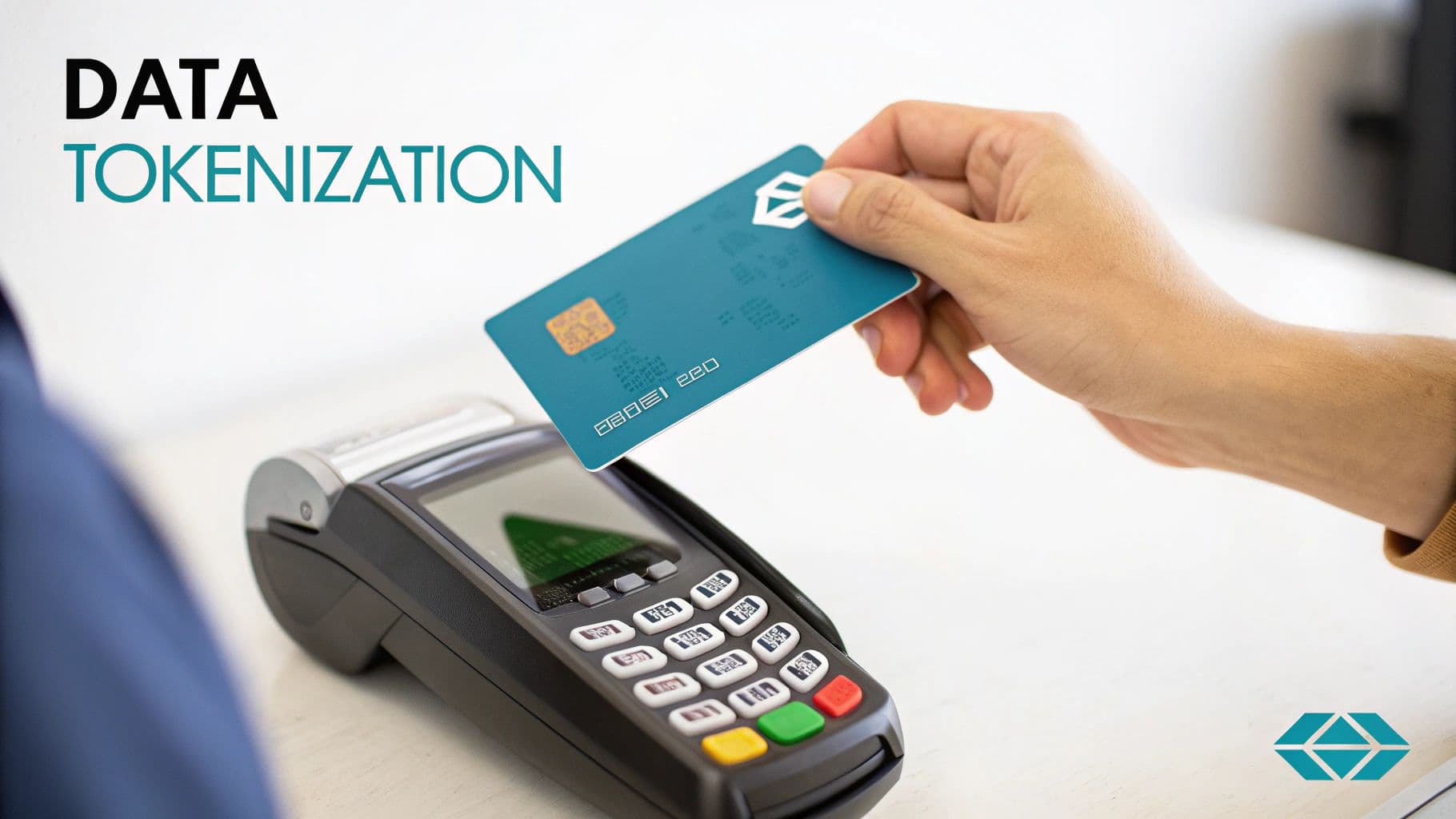
| Tokenisation | Data Obfuscation | Replaces real card numbers with a non-sensitive "token," making stolen data useless. |
| DTMF Masking | Data Isolation | Masks the tones customers enter on their keypad, so card numbers never enter your systems. |
| Secure Payment Links | Channel Separation | Moves the entire payment process to a secure, separate portal on the customer's device. |
| Point-to-Point Encryption (P2PE) | from start to finish card protection | Encrypts card data from the moment of capture so intermediate systems never see plaintext. |
These tools work together to create a secure bubble around your operations, keeping sensitive data far away from your agents and recordings.
How Tokenisation Secures Customer Payments
One of the most powerful tools for descoping is tokenisation. It's a simple idea with huge security implications.
Think of it like a casino chip. Inside the casino, that chip represents real money and you can use it to play. But if you walk outside with it, it's just a worthless piece of plastic. Tokenisation does the same thing for payment data.
When a customer gives you their card details, the system instantly swaps the actual card number for a unique, non-sensitive placeholder — a token. That token can be safely stored and used for future payments, but the real card number is never exposed in your systems. If a token leaks, the attacker has nothing of value.
Practical Ways to Keep Sensitive Data Out
Beyond tokenisation, leading solutions use techniques to stop sensitive data from ever touching your contact centre infrastructure. This keeps your call recordings and agent desktops clean and completely out of scope.
Two common techniques:
- DTMF Masking — When a customer keys in their card number on their phone, the agent hears only flat, muted tones. The sensitive DTMF (Dual-Tone Multi-Frequency) signals are captured by the secure payment platform, never reaching your contact centre systems or recordings. The agent stays on the line throughout — they can hear the customer, the customer can hear them, and the conversation continues naturally.
- Secure Digital Payment Links — An agent generates and sends a one-time, secure payment link to the customer via SMS or email. The customer completes the transaction on their own device in a secure portal, totally separate from the agent's environment. Useful when DTMF isn't available — for example on a poor mobile line, or where the customer prefers to type rather than tap.
Failure Modes to Watch For
Most "secure" payment flows in UK contact centres fail in predictable ways. Watch for these:
- Pause-and-resume recording — agents press pause when card details are read out, then resume. This puts you firmly in PCI scope and relies on agents remembering to press the button. Auditors will spot this immediately.
- Hosted pages that load tracking scripts — if your hosted payment page loads Google Analytics, a chat widget, or an ad pixel, you've just dragged third-party JavaScript into your CDE. PCI DSS v4 requirement 6.4.3 cares about this.
- Shared service accounts — one shared agent login for the payment system. Fails requirement 8.2 and makes any incident impossible to attribute.
- "PCI-certified" CCaaS without DTMF masking — the platform is certified, but the moment a customer reads out their card number to an agent, you're back in scope. Certification of the supplier doesn't descope the customer.
For a deeper look, see our guide to PCI DSS requirements. This deliberate approach doesn't just simplify compliance — it builds a foundation of trust with every customer.
Integrating Your Contact Centre for Maximum ROI#
A cloud contact centre rarely works in isolation. Its real power isn't in the flashy features, but in how deeply it connects with the other systems that run your business. Without these links, you end up with information silos, forcing agents to juggle screens. That's a recipe for frustrated staff and slow service.
Think of your contact centre as the brain of your customer service operation. It's intelligent on its own, but it can't act effectively without a central nervous system. Integrations are that nervous system, carrying vital information back and forth between the brain and the rest of the body — your other business tools.
When these systems work in harmony, agents get a complete, real-time picture of every customer. This unified view leads to faster resolutions, more personalised conversations, and a measurable lift in overall efficiency.
Core Integration Categories
To build a truly connected operation, your integrations will typically fall into three categories. Each plays a unique role in creating a frictionless experience for both your team and your customers.
- Telephony Systems — This is the foundational link. Integrating with your Voice over IP (VoIP) or existing phone system ensures crystal-clear call quality, reliable connections, and the ability to manage voice channels right from the contact centre platform.
- Business Applications — Where you connect your contact centre to the software that runs your operations. The most common and vital integration is with your Customer Relationship Management (CRM) platform, but this also includes helpdesk software, ERP systems, and internal knowledge bases.
- Payment Gateways — For any business that takes payments over the phone, this integration is non-negotiable. It connects your contact centre to your payment processor, allowing for secure, compliant, and efficient transaction handling directly within the customer interaction.
The Power of a Connected CRM
Let's focus on the single most impactful integration: the CRM. When your contact centre and CRM are properly linked, an incoming call triggers a screen pop, presenting the agent with the customer's entire history before they even say hello.
The agent instantly sees:
- Past purchases and order history
- Previous support tickets and their outcomes
- Notes from prior conversations with other agents
- Customer loyalty status or value
- Vulnerability flags or accessibility preferences (a Consumer Duty essential)
This context is a major improvement. It eliminates the dreaded "Can you tell me your account number again?" and changes a generic interaction into a personal, efficient one. Agents can resolve issues on the first contact 30-40% more often when they have this kind of unified view.
Securely Integrating Payments
Integrating with a secure payment platform is just as important. It allows an agent to take a payment mid-conversation without ever handling sensitive card data themselves. Instead of asking a customer to read their card number aloud, the agent uses a secure method like sending a payment link or using DTMF masking to capture the details.
Paytia is a Stripe partner and connects to the major UK acquirers and PSPs — Worldpay, Adyen, Barclaycard, Elavon — without you needing to change processor. That matters because in practice, payment integration is the project step most teams underestimate. The CCaaS vendor will tell you they "support payments." What they actually mean is they support displaying a payment URL on the agent screen. That's a long way from a fully descoped flow.
This separation is vital for compliance. By keeping payment details out of your core contact centre environment, you drastically reduce your PCI DSS scope, protecting your business from risk and your customers from fraud.
For a deeper look at how this works behind the scenes, see our payment gateway API integration guide.
Common Integration Patterns by Sector
What integrations actually matter depends heavily on what you do. A handful of UK-specific patterns we see:
- Housing associations and local authorities — CCaaS + housing management system (Capita One, Civica Cx, MIS-AMS) + Paytia for rent payments. Repairs go through one workflow, payments through a fully descoped one.
- Insurance brokers — CCaaS + Acturis or Open GI + Paytia for premium collection. The broker workflow and the payment capture stay deliberately separate, with the agent never seeing the card number.
- FX bureaux and money services — CCaaS + back-office reconciliation + Paytia for card-to-account funding. The MLR 2017 obligations sit on the bureau, not the CCaaS vendor.
- Utility and telecoms collections — CCaaS + billing system + Paytia for both one-off settlement and recurring direct debit setup.
Thoughtful integration turns your contact centre from a simple communication tool into the intelligent hub of your entire customer experience strategy.
How to Plan Your Migration and Avoid Common Pitfalls#
Moving to the cloud is a big step, but it doesn't have to be a painful one. With a clear plan, what seems like a massive project becomes a manageable, step-by-step transition. A solid migration roadmap is your best defence against blown budgets and missed deadlines.
This isn't just a tech project; it's a people project. Success starts long before you even look at a contract.
The first phase is discovery. You need to set clear, measurable goals. What specific headaches are you trying to cure? Are you trying to cut operational costs, finally enable a fully remote team, or boost your First Contact Resolution rates? Nailing these objectives down gives the entire project a clear direction.
This is also the time to get your team together. Critically, this can't just be an IT-led initiative. You need people from every key department in the room — customer service, operations, finance, compliance, and (if you're regulated) your Money Laundering Reporting Officer or DPO. This ensures everyone's needs are heard and builds buy-in across the business from the start.
Creating a Phased Migration Plan
Trying to switch everything over at once — a "big bang" approach — is asking for trouble. A phased rollout gives you control, letting your team learn and adapt without bringing operations to a standstill.
Your plan should break the journey into clear stages:
- Vendor Evaluation and Selection — Use the goals you defined earlier to build a shortlist. Ask for demos that focus on your specific challenges, not just a tour of generic features. Get the vendor to demonstrate their PCI descoping story before you sign.
- Data Preparation and Cleansing — Your existing data — customer records, call logs, contact rules — is gold. Before moving it, clean it up. Get rid of duplicates, standardise the formatting, archive anything out of date.
- Pilot Programme — Start small. Pick a controlled group of agents to test the new system. This is your chance to iron out workflow kinks, spot integration problems, and get real-world feedback in a low-risk environment.
- Training and Onboarding — Don't skimp on this step. Great training is the difference between a tool people love and one they ignore. Focus on how the new platform will make their jobs easier, not just which buttons to press.
- Full Rollout and Go-Live — Armed with lessons from your pilot, you're ready for the company-wide migration. Make sure dedicated vendor support is locked in for the critical first fortnight.
UK-Specific Migration Checks
Beyond the generic steps, there are a few UK-specific items that consistently trip up first-time migrations:
- Number portability — porting 0800, 0300, or geographic numbers can take 10-15 working days through Ofcom processes. Build that in.
- Data residency — confirm your vendor stores data in the UK or EU. Some US-headquartered platforms default to US regions unless you ask.
- FCA and PRA notifications — if you're a regulated firm, material outsourcing arrangements may need notification under SYSC 8 or the new Critical Third Parties regime.
- Subject Access Requests — your new platform must be able to surface a specific customer's interactions within the 30-day GDPR window. Test this before go-live, not after.
- Call recording retention — work out who deletes what, when. Default 7-year retention is excessive for most use cases and increases breach exposure.
Avoiding the Most Common Pitfalls
Even the best-laid plans can go sideways. Knowing where the traps lie is the first step to avoiding them. Most migration failures aren't about the technology itself; they're about oversights in planning and communication.
A successful migration is 20% technology and 80% change management. If you fail to prepare your people for the new way of working, you're setting your project up for a stall and a poor return on investment.
Watch for these classic mistakes:
- Poor Stakeholder Engagement — If you don't involve key teams from the start, you'll face resistance and end up with a solution that doesn't solve the business's actual problems.
- Underestimating Training Needs — Assuming your agents will just "figure it out" is a recipe for frustration, low adoption, and wasted potential.
- Neglecting Data Cleanup — Migrating messy data is the definition of "garbage in, garbage out." It clutters your shiny new system and undermines its value from day one.
- Ignoring Integration Complexity — Failing to map out how the new platform will talk to your CRM or payment systems causes major operational headaches after you go live.
- Treating Payment Security as Phase Two — The single biggest mistake we see. Teams migrate the contact centre, then six months later realise they still have agents reading card numbers off Post-it notes. Build descoping into the migration, not as a follow-on project.
By following a structured plan and actively sidestepping these traps, you can run the migration with confidence and start seeing real value quickly.
What This Means for Buyers in 2026#
If you're shopping for a cloud contact centre solution this year, the centre of gravity has shifted. The CCaaS platforms themselves have largely converged on feature parity — omnichannel routing, recording, basic analytics, AI summarisation are now table stakes. What separates a smooth deployment from a painful one is everything around the edges:
- Payment descoping clarity — does the vendor have a real story for PCI DSS v4.0.1 scope reduction, or is "PCI-compliant" just a checkbox on a brochure?
- AI roadmap honesty — most vendors are racing to bolt on agent assist, summarisation, and intent prediction. Ask which features are GA, which are beta, and what your data is used for.
- Integration depth, not breadth — a CRM "integration" can mean anything from "deep two-way sync" to "we can open a URL." Ask for specifics.
- UK data residency — confirmed in writing, not just "available on request."
- Regulator-friendly audit trails — Consumer Duty outcome monitoring needs evidence. Make sure your platform can produce it.
The biggest single decision is still architectural: keep payments inside the CCaaS (and accept the full PCI scope that comes with it), or push them out to a dedicated payment-capture layer that integrates over the top. The latter is what Paytia does, and it's why customers using us see PCI scope cut by 95% without changing their contact centre platform.
Still Have Questions About Cloud Contact Centres?#
Making the switch to a cloud contact centre is a big decision. It's bound to stir up questions, affecting everything from budgets and project timelines to the way your teams work day-to-day. Getting straight answers is the only way to move forward with confidence.
The market itself continues to grow at pace. The UK contact centre software market, dominated by cloud contact centre solutions, pulled in USD 2,097.5 million in 2024. Projections show it reaching USD 14,362.2 million by 2033. This is largely driven by the permanent shift to hybrid work, with 70% of contact centres globally now planning for long-term remote capabilities.
At Paytia, our focus is securing customer payments, no matter what contact centre environment you use. Our platform is designed to lift sensitive card data completely out of your agents' hands and away from your systems, dramatically shrinking your PCI DSS scope and building customer trust. Learn how Paytia can secure your operations.
Related guides in this cluster#
A Complete Guide to Modern Call Centre IVR Systems
Everything you need to know about call centre IVR: how to design systems people don't hate, take payments securely under PCI DSS.
Aircall Phone Payments: Secure Integration with Paytia
Aircall handles the calls. Paytia adds PCI-certified secure payment capture without changing how your agents work. Here's how the two fit together.
Call Centre Payment Security: Complete 2025 Guide
Call centres taking card payments leak data across audio, recordings, screens, CRMs and agent memory.
How to Improve Call Centre Efficiency
Real tactics for shaving seconds off handle time, getting agents off admin work, and hitting SLAs without burning the team out. Skip the generic KPI advice.
How to Reduce Average Handling Time Without Wrecking CSAT
Cut average handling time the right way. Architectural fixes that shave 60-90 seconds off calls without burning out agents or destroying CSAT.
What Is Multichannel Customer Service? A Practical Guide
Phone, email, chat, web, social, SMS — what multichannel customer service actually means, what customers expect on each channel, and where it gets hard.
How to Improve Customer Satisfaction in Call Centres
The five or six things that actually move CSAT in a contact centre, and the polished tips that look good in slides but don't shift the score.
Contact Centre PCI Compliance: A Practical 2026 Guide
Every agent who hears a card number drags the network, the recording, the QA tools and the CRM into PCI scope.
Call Quality Monitoring in Contact Centres: 2026 Framework
A 2026 framework for call quality monitoring that actually changes agent behaviour, covers payments, and survives PCI DSS v4.0.1 evidence requests.
For the product side, see our Agent-assisted payments solution.
Want to see this working in your setup? Book a working-demo call — we'll wire up your actual phone system and show you a live capture.