Ever tapped your contactless card in a shop? Click to Pay is the online version of that. It's a universal way to pay online, backed by Visa, Mastercard, American Express and Discover, that lets you skip manually typing in your card details every single time. For context on how it fits alongside other payment methods, see our payment gateway integration guide.
Click to Pay in plain English#
Click to Pay is one button at checkout. Your customer clicks it, a saved card token gets used to pay, and they're done. No 16-digit PAN, no expiry, no CVC, no "create an account first." It works on any merchant site that supports the standard, and the same enrolment carries across merchants — that's the whole point.
If you've heard the term EMV SRC or EMV Secure Remote Commerce, that's the underlying technical standard. Click to Pay is the consumer-facing brand that the card networks slap on top. The same way "Chip and PIN" is the consumer brand and EMV is the standard underneath.
What "click to pay" actually means in 2026
The phrase gets used three different ways and it's worth being precise about which one you mean:
- Click to Pay (the standard) — the EMV SRC scheme run by the card networks. Capital C, capital P. That's what this article is about.
- "click to pay" (the generic phrase) — any one-click checkout, including Apple Pay, Google Pay, PayPal Express, Shop Pay, Amazon Pay. Different rails, different security models.
- "click to pay" link in an email or SMS — a payment link the customer taps to land on a hosted page. Useful, but not the same thing as the EMV SRC button.
We'll cover all three below, because UK buyers searching the term don't always mean the same one. If you're a merchant trying to decide whether to add the Click to Pay button to your checkout, what really matters is the EMV SRC version. If you're a contact-centre manager asking whether you can use "click to pay" to take a card over the phone, you actually want a payment link or our agent-assisted telephone payment flow — the EMV SRC button doesn't work over voice.
A Guide to Frictionless Online Payments#
Your customers see a familiar icon at checkout, click it, and the payment is done. No wallet hunt, no forgotten password.
This isn't just some random new feature. It was created by the payment industry's heavyweights — Visa, Mastercard, American Express, and Discover — to tackle two of the biggest headaches in e-commerce: abandoned carts and payment security. By creating one standardised button, they've gotten rid of the tedious task of punching in a 16-digit card number, expiry date, and CVC for every single purchase.
More Than Just a Button
It helps to think of Click to Pay as more than just another payment option. It's the digital evolution of the EMV chip that's in your physical card, bringing that same smart, trusted security to the online world.
It recognises you on your devices and lets you pay with any saved card, without a separate account per merchant. This is a massive improvement over traditional methods. To see how it stacks up against other ways of storing card details, you can explore our detailed guide on what a digital wallet is and how they work.
This unified standard is arriving just in time. The UK's digital payments market, valued at USD 11.7 billion in 2025 and projected to hit USD 13.5 billion in 2026, shows just how quickly consumers are moving towards easier ways to pay.
Click to Pay is built on a technical standard called EMV® Secure Remote Commerce (SRC). This is the framework that keeps every transaction safe with layers of security, including network tokenisation. It replaces sensitive card data with a unique digital identifier, keeping the real details under wraps.
To really grasp what Click to Pay is, you have to see its dual advantage. Customers get a simple checkout. Your business gets stronger security. It simplifies the whole transaction, directly addressing the main reasons people give up on their purchases, and builds trust right from the start.
This blend of speed and security is changing what people expect from online and over-the-phone payments.
To help you get a clearer picture, here's a quick summary of what Click to Pay brings to the table.
Click to Pay At a Glance
| Feature | Description | Benefit for Your Business |
|---|---|---|
| Standardised Button | A single, recognisable icon across all participating websites and payment platforms. | Builds instant customer trust and familiarity, reducing hesitation at checkout. |
| Guest Checkout | Customers can pay without creating a new account or password for your site. | Lowers the barrier to purchase, which is a major driver in reducing cart abandonment. |
| Intelligent Recognition | Securely recognises returning customers on their trusted devices. | Delivers a fast, one-click payment experience that encourages repeat business. |
| EMV® SRC Security | Built on a global standard with multi-layered security, including network tokenisation. | Improves security and can help simplify your PCI DSS compliance requirements. |
| Major Network Backing | Supported by Visa, Mastercard, American Express, and Discover, ensuring wide acceptance and reliability. | Offers a credible, reliable payment method that appeals to a broad customer base. |
In short, Click to Pay isn't just another payment method; it's a smarter, safer, and much simpler way to handle transactions for everyone involved.
How a Click to Pay Transaction Works#
So, what really happens when a customer clicks that little icon? Behind that simple button is a surprisingly elegant process, one that's been fine-tuned for both speed and security. It's a clever bit of coordination between your customer, your checkout, and the card networks, all wrapped up in a few seconds.
Let's pull back the curtain and look at how it works, first from the customer's point of view and then from the merchant's side of the counter.
The entire system is designed to get rid of the usual checkout headaches without cutting corners on security. It's a balancing act: the customer wants to pay and get on with their day, and you need to know their payment data is safe.
The flowchart below shows just how simple the journey is for the user. No more forgotten passwords or fumbling for a wallet. Just one click.
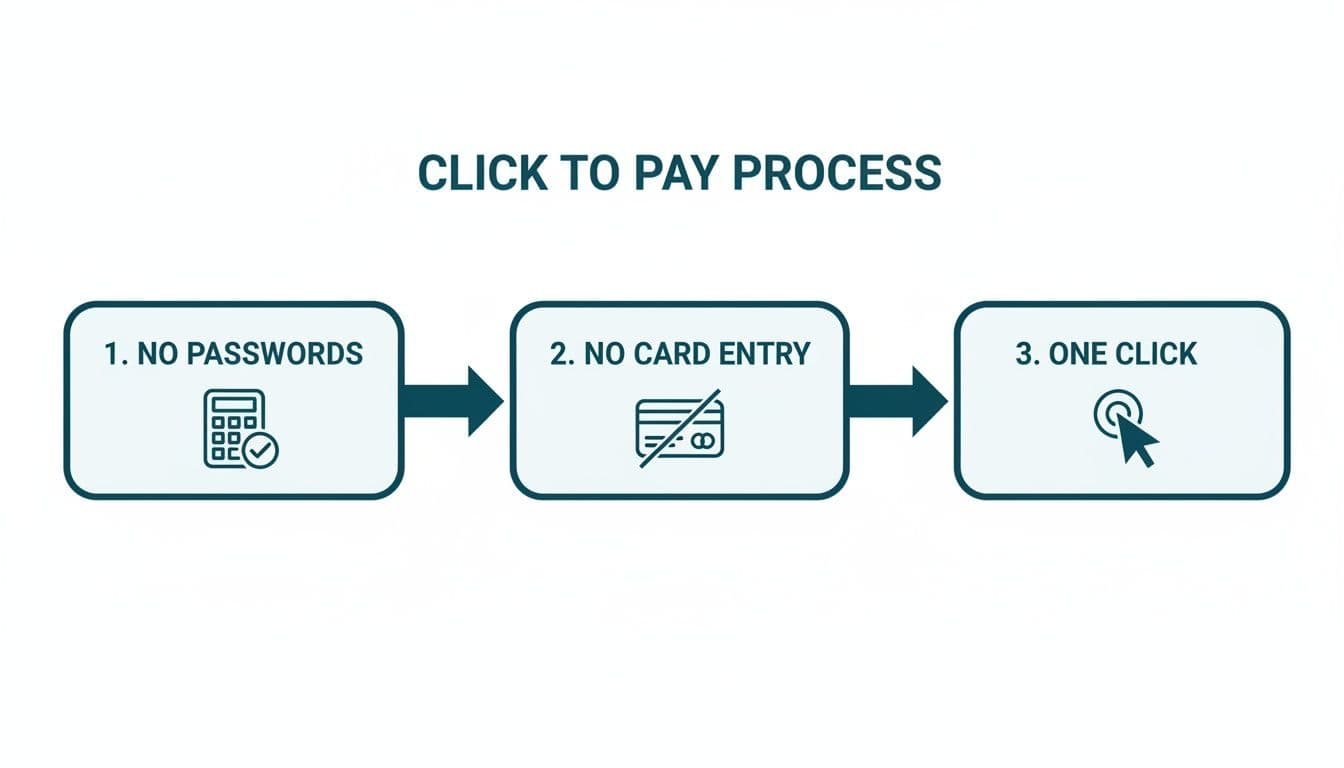
This visual really gets to the heart of what makes Click to Pay so appealing — it strips the checkout experience down to its absolute essentials.
The Customer Journey: A Smooth Experience
For your customer, the process is incredibly straightforward. The goal is to make paying feel almost invisible, letting them complete their purchase without the usual stops and starts.
Spot the Icon — The customer heads to checkout and sees the Click to Pay icon — that stylised logo with an arrow inside a circle — next to the other payment options. This is their cue for a faster, safer way to pay.
Get Recognised — As soon as they type their email address, the system smartly identifies them. If they're on a device they've used before, it might recognise them automatically. First-timers are prompted to enrol by entering their card details just once. That info is then securely saved for any site that offers Click to Pay.
Quick Check — To make sure it's really them, the system might send a one-time passcode to their phone or email. It's a quick verification step that adds a solid layer of security without feeling like a major hurdle.
Confirm and Go — The customer sees their saved cards, picks one, and confirms the payment. That's it. No need to re-enter the long card number, expiry date, or CVC code. The transaction is done.
The real upside here is the "remember me" function. Once a customer is enrolled, the system can recognise them across any participating merchant's website. What was once a chore becomes a simple, one-click action for returning shoppers.
This smooth, frictionless flow is a powerful weapon against abandoned carts. In fact, research shows that 28% of online shoppers in the UK will ditch their purchase if the checkout process is too long or complicated. By removing those roadblocks, Click to Pay directly tackles one of the biggest conversion killers.
The Merchant Process: Secure and Simplified
While the customer is enjoying that breezy checkout, a serious security operation is happening behind the scenes to protect everyone involved. Crucially, your business never has to handle or store raw card data, which massively reduces your security and compliance burden.
Is Click to Pay the same as Apple Pay or Google Pay?#
This is the question we get from merchants more than any other: "if I already accept Apple Pay and Google Pay, do I need Click to Pay too?" Honest answer — they're not the same thing, and you probably want both.
Click to Pay vs Apple Pay
Apple Pay only works in Safari on Apple devices, plus inside iOS apps. Click to Pay works in any browser, on any device, on any OS. If 40% of your traffic is Android Chrome, Apple Pay does nothing for those customers — Click to Pay does. The two coexist happily side by side at checkout.
Click to Pay vs Google Pay
Google Pay is similar — it's tied to the Google account, works best in Chrome on Android, and depends on the customer having added a card to their Google wallet. Click to Pay enrols the card once at any participating merchant and works everywhere after that. There's overlap, but neither replaces the other.
Click to Pay vs PayPal
PayPal isn't a card scheme — it's a separate payments network and bank transfer rail. Click to Pay uses the customer's existing Visa or Mastercard, settles to your normal merchant acquirer, and your fees stay on your standard interchange. PayPal sits outside that.
Click to Pay vs your own "save card" feature
This is the one most worth thinking about. If you store cards on your own merchant profile, your customer has to re-enter the card the next time they buy from a different merchant. Click to Pay enrols once and works across all participating sites. From a PCI standpoint, the card is held by the network token vault, not you — which is the point.
Click to Pay and PCI DSS — what actually changes#
This is where we have a position the card networks don't always spell out: adding Click to Pay to your online checkout doesn't take you out of PCI DSS scope on its own. It just changes which SAQ you fill in and reduces the data your servers ever touch.
Specifically:
- If your checkout already redirects or iframes a hosted card form (Stripe Elements, Adyen Drop-in, Worldpay HPP, etc.), you're likely on SAQ A already. Click to Pay doesn't push you lower — you're already at the floor.
- If you handle the card form yourself (your own JS reads the PAN), you're on SAQ A-EP or higher. Swapping the manual card form for a Click to Pay button doesn't help if the rest of the page is still in scope.
- For over-the-phone payments, Click to Pay does nothing for you. The customer can't tap a button while they're on a voice call with an agent. That's where our DTMF masking approach takes the agent out of scope, or where a payment link sent mid-call lets the customer self-serve.
The honest take: Click to Pay is a checkout UX win and a network-tokenisation security win. It is not a get-out-of-jail card for PCI DSS. Anyone telling you otherwise is overselling it.
Click to Pay over the phone — what merchants actually mean#
A lot of the UK searches for "click to pay" come from contact centres trying to solve the agent-on-the-phone problem. The EMV SRC button is a browser thing — it won't help an agent collecting a card during a voice call. But there are two adjacent flows people often mean when they say "click to pay over the phone":
- Send a payment link mid-call — the agent stays on the line, the customer gets an SMS or email with a one-click link, taps it, pays on a hosted page. The agent never sees the card. This is our payment links flow, and it's the closest voice equivalent of "click to pay."
- Keypad-entry on the customer's own phone — the customer types the card into the keypad while still talking to the agent, the digits get masked to monotone, and the card goes straight to the gateway. This is DTMF masking. Different mechanism, same outcome: agent out of scope, customer in control.
For contact centres the choice between those two usually comes down to caller demographics and whether the customer has a smartphone within reach. Most of Paytia customers offer both.
Click to Pay in the UK — availability and adoption#
UK rollout has been slower than the US. Visa and Mastercard both support Click to Pay for UK-issued cards, and most major UK acquirers — Worldpay, Stripe, Adyen, Barclaycard, Elavon, Global Payments — let merchants enable the button via their gateway. The friction has been customer awareness, not technical readiness. Most UK shoppers still don't know what the icon means.
Our position on adoption timing: if you run a UK e-commerce site and your acquirer offers Click to Pay at no extra cost, turn it on. It sits alongside Apple Pay, Google Pay and your manual card form, costs you nothing, and gives the customer one more option. The downside is essentially zero; the upside grows as awareness builds.
If you're a UK contact centre and you're being sold "Click to Pay" by a vendor as a voice-payment solution — push back. That's not what EMV SRC does. You want agent-assisted telephone payments or a payment link, not the EMV SRC button.
Click to Pay enrolment — what the customer has to do once#
The thing that catches a lot of first-time users out is that the first transaction takes a bit longer than they expected, because they have to enrol. Here's the actual flow:
- Customer reaches checkout, taps Click to Pay.
- System asks for their email. If they're already enrolled with any merchant via any of the card networks, they get recognised straight away.
- First-time enrolment: customer enters card details (PAN, expiry, CVC, name, postcode) once. The card is tokenised and stored at the network token vault.
- One-time passcode by email or SMS confirms it's really them.
- Every future Click to Pay transaction at any participating merchant just needs the email and an OTP — sometimes not even the OTP if it's a recognised device.
That "once across all merchants" enrolment is the whole reason the standard exists. Without it, customers would have to re-enter the card at every site, which is what they already do today.
What we recommend for UK merchants in 2026#
Quick, no-fence-sitting summary:
- Online checkout — turn Click to Pay on. Free, low-risk, gives customers one more option, and the tokenisation reduces your data exposure regardless of whether anyone uses it.
- Card-on-file for repeat customers — Click to Pay isn't a replacement. It's a customer-controlled vault, not a merchant-controlled one. If you need to bill the same card monthly without the customer being present, you still want acquirer-side tokenisation.
- Over-the-phone payments — Click to Pay doesn't help. Use DTMF masking or payment links, depending on whether the customer needs to stay on the call or can pay independently.
- PCI scope reduction — Click to Pay alone won't move you between SAQs. The bigger wins come from never letting card data touch your systems in the first place, which is the principle behind both Click to Pay (online) and our channel separation approach (voice).
Frequently Asked Questions#
What is Click to Pay in simple terms?
Click to Pay is a one-button online checkout standard run by the card networks. The customer enrols their Visa or Mastercard once, then pays at any participating merchant with a single click — no re-typing the card number.
How does Click to Pay work?
The customer enters their email at checkout, the system recognises them (or asks them to enrol once), an optional one-time passcode confirms identity, and the saved card token is used to settle the transaction. The merchant never sees the raw card number — it's replaced with a network token.
Is Click to Pay the same as Apple Pay or Google Pay?
No. Apple Pay and Google Pay are device-tied wallets. Click to Pay is browser-based and works on any device or operating system. Most merchants offer all three side by side because they cover different customers.
Is Click to Pay available in the UK?
Yes. Visa and Mastercard both support Click to Pay for UK-issued cards, and most major UK acquirers can enable the button at checkout. Customer awareness is still building, but the technical rails are live.
Does Click to Pay make me PCI compliant?
No. Click to Pay reduces the card data your systems ever touch, which helps — but you still need to complete the appropriate SAQ and meet PCI DSS v4.0.1 requirements. For most checkouts already using a hosted card form, Click to Pay doesn't change which SAQ you fill in.
Can I use Click to Pay to take payments over the phone?
Not directly — the EMV SRC button is a browser interaction. For phone payments, send a payment link the customer can tap during or after the call, or use DTMF masking so the customer keys the card in on their own phone while staying on the line.
What's the difference between Click to Pay and a payment link?
Click to Pay is a button on your own checkout page that uses the EMV SRC standard. A payment link is a URL you send to the customer by email or SMS that lands them on a hosted payment page. Payment links work over the phone; Click to Pay doesn't.
Does Click to Pay cost the merchant extra?
Usually not on top of standard scheme fees. Card-present and card-not-present interchange still applies, and most acquirers don't charge extra to enable the button. Check with your specific acquirer.
What's EMV SRC?
EMV Secure Remote Commerce — the technical standard that Click to Pay is the consumer-facing brand for. Run by EMVCo, the same body behind the chip in your physical card.
Which card networks support Click to Pay?
Visa, Mastercard, American Express and Discover. Diners Club and JCB also participate in some regions. The same enrolment carries across all participating networks.