
Integrating a payment gateway API is all about connecting your software—like your e-commerce store or CRM—directly to the gateway's services. You're using their Application Programming Interface (API) to build a bridge that lets you securely handle customer payments right inside your own platform. The whole point is to automate this process and create a smooth transaction experience without ever forcing your customers to leave your site. The pattern of routing transactions between multiple providers and rails is called payment orchestration.
Laying the Groundwork for a Solid API Integration#
Before you even think about writing code, take a step back. (If the merchant-account piece of the puzzle is still open, our merchant services page explains what Paytia handles and what your acquirer handles.) A successful payment gateway integration starts with a solid plan and a real understanding of the fundamentals. Teams that jump straight into development often hit security gaps, expensive mistakes like double-charging, and a lot of frustration. Think of this planning phase as creating the blueprint; it ensures everything you build later is stable, secure, and works as expected.
To get the full picture, you first need to understand how merchant accounts and payment gateways work together. They're two sides of the same coin — we walk through the acquirer side in merchant acquirer banks and payment processing (and the specific role of the merchant acquiring bank, plus the wider shape of a payment platform), and the gateway/processor split in what is a payment service provider.
Getting Authentication Right
Authentication is your front door security. It's how the payment gateway confirms that any API request is actually coming from your application and not some bad actor trying to cause trouble. You'll typically run into two main methods: API keys and OAuth 2.0.
- API Keys — This is the simplest approach. The gateway gives you a unique, secret key that you include in the header of every API request you make. It's clean, effective, and ideal for server-to-server communication where your app is the only one talking to the gateway.
- OAuth 2.0 — This is a more substantial framework you'll need when your application has to perform actions on behalf of a user. For instance, if you're building a platform where merchants connect their own payment accounts, OAuth 2.0 provides a secure way for them to grant your app limited permissions without ever sharing their secret credentials with you.
Which one should you use? It really depends on your specific needs. If it's just your server communicating with the gateway, an API key is usually all you need. If you need to let your users connect their own accounts, OAuth 2.0 is the industry standard.
Understanding the Request and Response Flow
Every conversation with the gateway's API follows a simple rhythm: your application sends a request, and the gateway sends back a response. This back-and-forth is usually handled using JSON (JavaScript Object Notation), which is just a straightforward, easy-to-read format for structuring data.
For example, when you want to create a payment, your request might include the amount, currency, and a payment method token. The gateway takes that information, processes it, and then sends a response with a transaction ID, a status (like succeeded or failed), and any error codes if something went wrong. Nailing this flow is key to keeping your own records updated and giving clear, immediate feedback to your customers.
Here's the minimum shape of a payment request. Most modern gateways follow the same pattern: a POST with a JSON body, an Authorization header carrying your secret key, and an idempotency key so the request is safe to retry without double-charging.
POST /v1/payments HTTP/1.1
Host: api.example-gateway.com
Authorization: Bearer sk_live_4eC39HqLyjWDarjtT1zdp7dc
Idempotency-Key: 8a3f1b2c-7d9e-4f6a-b1c2-3d4e5f6a7b8c
Content-Type: application/json

{
  "amount": 4999,
  "currency": "GBP",
  "payment_method": "tok_visa_4242",
  "description": "Order INV-2026-0042",
  "capture": true
}
A successful response returns a transaction ID, the cleared amount, and a status field your application reads to confirm the order:
HTTP/1.1 200 OK
Content-Type: application/json

{
  "id": "txn_3MtwBwLkdIwHu7ix28a3tqPa",
  "amount": 4999,
  "currency": "GBP",
  "status": "succeeded",
  "captured": true,
  "created": 1714032000,
  "payment_method": "tok_visa_4242"
}
Field names vary between gateways but the shape is always the same: authenticate, post a JSON body describing the payment, read the transaction ID and status from the response. Errors come back with non-2xx status codes and a structured error body — see the error-handling section below for the recommended response strategies.
Pro Tip: Get a Handle on Idempotency from Day One An idempotent request is one you can send over and over again while only getting a single result. Gateways use "idempotency keys"—a unique value you create and send with each request—to prevent accidental duplicate charges if a network glitch happens. Do this: implementing this from the very beginning will save you from some serious headaches down the road.
Why Your Sandbox Environment is Your Best Friend
Never, ever skip the sandbox. This is a testing environment the payment gateway provides that acts just like the live, real-money environment but uses test card numbers and fake data. It's your personal, risk-free playground.
Before you go live, you need to hammer this sandbox. Simulate everything you can think of: successful payments, every possible type of card decline, and various error responses. You can find more practical integration examples and resources at https://www.paytia.com/resources/integration to see how this fits into the bigger picture. A thorough testing phase in the sandbox is the single best thing you can do to guarantee a problem-free launch.

Designing for Security and PCI Compliance#
When you're integrating a payment gateway, security isn't just a checkbox on a feature list; it's the bedrock of the entire system. Getting this part wrong leads to more than just technical debt. It can open the door to catastrophic data breaches, shatter customer trust, and bring down hefty financial penalties. From the very first line of code, your mission is to protect sensitive cardholder data and, just as importantly, shrink your organisation's PCI DSS (Payment Card Industry Data Security Standard) footprint.

The single most powerful strategy for easing your compliance burden is tokenization. Think of it as swapping highly sensitive information—like the long Primary Account Number (PAN) on a credit card—for a unique, non-sensitive stand-in called a token. This token can then be safely stored on your systems and used for recurring payments or other actions without ever exposing the actual card details again.
By building your integration so that raw card data never even grazes your servers, you can drastically reduce your PCI scope. This translates to fewer, less complex security controls to implement, more straightforward audits, and a much lower risk profile for the business. If you need to get up to speed on the specifics, our detailed PCI compliance guide is a great place to start.
Client-Side vs Server-Side Tokenization
When it comes to implementing tokenization, you'll face a fork in the road. The path you choose depends entirely on your specific payment flow and technical architecture.
Client-Side Tokenization — This is the modern standard for a reason. The card details are captured directly on the user's device—their web browser or mobile app—and sent straight to the payment gateway. The gateway does its magic and sends a token back to your application. Your server only ever handles this safe token, keeping it completely isolated from the sensitive data. It's the go-to method for nearly all web and mobile payment forms.
Server-Side Tokenization — In this setup, card details hit your server first before you forward them to the payment gateway to be tokenized. While this is sometimes unavoidable for specific use cases, like importing a batch of cards from a previous payment provider, it puts your server squarely in PCI scope. That means you're on the hook for much stricter, more expensive security measures.
For almost every new integration, client-side tokenization is the clear winner. It offers the biggest reduction in compliance overhead and is more secure by design.
Securing Data in Transit with Encryption
Tokenization handles data at rest, but you also have to protect it as it moves across networks. That's where full encryption (E2EE) comes in. E2EE ensures payment information is scrambled on the client's device and can only be unscrambled by the payment gateway itself. This makes the data unreadable to any intermediaries, including your own servers.
It's like sending a package in a locked box where only the final recipient—the payment gateway—has the key. This is usually managed with Transport Layer Security (TLS) for all API calls. It's important to ensure you're using a current, secure version (TLS 1.2 or higher) and have explicitly disabled any older, vulnerable protocols.
Key Takeaway — Your security posture is only as strong as your weakest link. Combining client-side tokenization with strong full encryption creates a multi-layered defence, safeguarding sensitive data both when it's stored and when it's on the move.
Architecting Secure Agent-Assisted Flows
Things get particularly tricky in environments like contact centres, where an agent helps a customer make a payment over the phone. The risk of card data exposure here is real—it can be spoken aloud, accidentally captured in call recordings, or jotted down on a sticky note.
This is where you need specialised tech. Solutions like Dual-Tone Multi-Frequency (DTMF) suppression are designed for this exact scenario. The customer uses their telephone keypad to enter their card details, but the tones are intercepted and sent directly to the payment gateway, bypassing the agent's computer and the call recording system completely. The agent can stay on the line to guide the customer, but the contact centre environment is completely removed—or 'de-scoped'—from handling any sensitive data.
As you plan your integration, you need to think about these agent-assisted flows from day one to ensure your architecture is secure and compliant across the board.
Want to see this working in your setup? Book a working-demo call — we'll wire up your actual phone system and show you a live capture.
Managing Asynchronous Events with Webhooks#
When you're integrating a payment gateway, it's easy to fall into the trap of thinking every action gets an instant, synchronous response. You send a payment request, you get a simple success or fail back. Job done, right? Well, not quite.
Many of the most critical events in a payment's journey don't happen in that neat little window. Think about a bank transfer finally clearing, a recurring subscription payment going through, or—the one everyone dreads—a customer initiating a chargeback. These are all asynchronous events. They happen on their own schedule, and constantly polling the API to ask "Anything new yet?" is wildly inefficient.
This is where webhooks become absolutely essential to your architecture. In simple terms, a webhook is just an automated message the payment gateway sends to your application when a specific event happens. Instead of you asking, the gateway proactively tells you, "Hey, this payment just succeeded," or "Alert, a new dispute has been opened for this transaction."
Building a solid webhook system isn't optional if you want an accurate, real-time picture of your transactions. It's the critical link that keeps your internal systems—like your CRM, order management, or accounting software—perfectly in sync with what's actually happening with your money.
Setting Up Your Webhook Endpoint
First things first, you need to create a dedicated API endpoint in your application. This is a specific, publicly accessible URL that will listen for these incoming notifications from the gateway. Its only job is to catch these event messages and kick off your internal processes.
Once you have that URL, you'll need to register it inside your payment gateway's dashboard. This is also where you'll tell the gateway exactly which events you care about. It can be tempting to just subscribe to everything, but trust me, you'll save yourself a lot of noise and processing overhead by only listening for events that actually matter to your business logic.
At a minimum, you'll almost certainly need to handle events like:
payment.succeeded: This is your green light to fulfil an order.payment.failed: Time to update the order status and let the customer know.dispute.created: Your trigger to immediately start gathering evidence for the chargeback.invoice.payment_succeeded: Absolutely important for subscription models to confirm a renewal.
The Critical Importance of Signature Validation
Having a publicly open endpoint is, by its nature, a potential security risk. What's to stop a bad actor from sending a fake payment.succeeded notification to your endpoint, tricking you into shipping products for free? This is precisely why webhook signature validation is non-negotiable.
Here's how it works: the gateway signs every webhook request it sends with a unique signature, usually found in the request header. This signature is created using a secret key that only you and the gateway know. Your endpoint's first job is to recalculate that signature using the message payload and your secret key. If your calculated signature doesn't match the one in the header, you must reject the request. This is your proof that the notification is authentic and hasn't been tampered with.
Important Takeaway Never, ever process a webhook without first verifying its signature. Skipping this step leaves you wide open to spoofing attacks that can have severe financial consequences. It's the digital equivalent of checking someone's ID before letting them into a secure building.
Building a Resilient Webhook Handler
Things go wrong. It's a fact of life in development. Your server might be down for a moment, or a network blip could prevent a webhook from being delivered. A well-architected handler is built with this reality in mind.
Your endpoint should be designed to immediately respond with a 200 OK status to acknowledge that it has received the message. The actual heavy lifting—updating your database, calling other services—should be handed off to a background job queue. This approach prevents timeouts and ensures your system can gracefully handle a sudden flood of notifications without falling over. For a practical look at managing this at scale, it's worth exploring how to go about connecting webhook sources to Kafka.
Finally, your handler must be idempotent. This is a fancy way of saying it should be able to process the same event notification multiple times without creating duplicate entries or actions. Gateways will often retry sending an event if they don't get that 200 OK from you quickly, so you need to be ready for repeats. This is especially important in complex systems like Paytia's gateway integration layer, where data consistency is absolutely critical.
Well-implemented webhooks are the difference between a payment integration that you chase for status updates and one that quietly keeps your systems in sync. For subscription products in particular, they're not optional.

Building Resilient Systems with Smart Error Handling#
Any seasoned developer knows that a truly reliable integration isn't defined by its sunny-day scenarios. The real test is how it behaves when things go wrong. In the world of payments, you have to assume things will go wrong. Connections will drop, cards will get declined, and servers will throw a wobbly. A resilient system anticipates this chaos and has a smart, automated plan for every type of failure.
If you skimp on proper error handling, you're setting yourself up for a world of pain. It leads to a dreadful customer experience, leaving users staring at cryptic error messages, and it directly translates to lost revenue. A well-thought-out system, on the other hand, can tell the difference between a temporary hiccup and a complete dead end, giving clear feedback and even saving transactions that would otherwise be lost for good.
Sorting Out Your API Errors
The first thing you need to do is get organised. Not all errors are created equal, and your code needs to understand what it's dealing with to make the right move. Broadly speaking, the errors you'll get back from the API fall into a few distinct buckets.
Think of it like this:
Gateways are the pipe that carries your merchant credit processing traffic to the acquirer.
- Authentication Errors (401 Unauthorized) — This is a showstopper. It usually means your API key is wrong, has expired, or doesn't have the right permissions. This isn't a customer issue; it's a critical system problem that needs your immediate attention.
- Invalid Requests (400 Bad Request) — This one's on you. The gateway is telling you that you've sent something it can't process. Maybe you've missed a required parameter, used the wrong data format, or sent an invalid value. The only way forward is to dig into your code and fix what's generating the request.
- Server Errors (5xx Codes) — These mean the problem is on the payment gateway's end. A
500 Internal Server Erroror a503 Service Unavailabletells you their systems are having a bad day. These are the perfect candidates for a retry strategy.
Soft Declines vs. Hard Declines: Knowing When to Quit
When it comes to payment-specific errors, the most important distinction you'll ever make is between a soft decline and a hard decline. Getting this wrong can have serious consequences.
A soft decline is just a temporary setback. The customer's bank has said "no for now," but might change its mind if you ask again. This could be due to anything from insufficient funds (which the customer might top up) to a temporary glitch in their own system.
Most US-facing gateways expose an ACH payment endpoint alongside the usual card APIs.
A hard decline, however, is a final, non-negotiable "no." The bank has a very clear reason for rejecting the payment, and trying again with the same details is completely pointless. Think stolen cards, invalid card numbers, or expired cards.
Important Takeaway You must never retry a transaction after a hard decline. Persisting can get your merchant account flagged for "card testing" by the card networks, which can lead to higher fees or even getting your account shut down. Your system needs to recognise a hard decline and immediately stop.
Implementing Smart Retry Logic
For those temporary issues—like network timeouts or 5xx gateway errors—a smart retry mechanism is your best friend. But just hammering the API immediately after a failure is a terrible idea; you could be making a bad situation worse. The gold standard here is exponential backoff.
It's a simple but powerful concept:
- After the first failure, wait a short, fixed period, say 1 second, before trying again.
- If that also fails, double your waiting time to 2 seconds.
- Keep doubling the delay with each subsequent failure, up to a sensible limit (maybe 3-5 attempts).
This approach gives the gateway's servers a chance to recover without your system adding to the overload. It's a much more neighbourly—and effective—way to handle transient faults.
Handling mobile wallets (Apple Pay, Google Pay) cleanly matters in UK e-commerce now — consumers increasingly expect them as checkout options, and most modern gateway APIs expose them as first-class methods rather than separate integrations.
Below is a quick-reference table to help you map out your response strategy for the most common HTTP status codes you'll encounter.
API Error Codes and Recommended Actions
| HTTP Status Code | Meaning | Common Cause | Recommended Action |
|---|---|---|---|
| 400 | Bad Request | Missing parameters, invalid data format. | Do not retry. Fix the request logic in your code. Log the error for developer review. |
| 401 | Unauthorized | Invalid or expired API key. | Do not retry. Trigger an immediate alert for your technical team to investigate. |
| 402 | Payment Required | A card decline (could be soft or hard). | Do not retry automatically. Inspect the specific decline code to differentiate soft/hard. |
| 404 | Not Found | Requesting a resource that doesn't exist (e.g., txn ID). | Do not retry. Check the identifier being used. Log as a potential logic error. |
| 429 | Too Many Requests | You've exceeded your API rate limit. | Implement exponential backoff. Check API docs for your specific rate limits. |
| 500, 503, 504 | Server-Side Error | A temporary issue with the payment gateway. | This is a transient error. Implement an exponential backoff retry strategy. |
Ultimately, your error handling is only as good as your testing. Your sandbox environment is your playground for chaos. Use test card numbers designed to trigger specific soft and hard declines. Deliberately simulate network failures to see if your exponential backoff logic kicks in correctly. Battle-testing every failure scenario in the sandbox is the only way to ensure your application will be stable and reliable when it's handling real money.
Choosing the Right Integration Strategy#
Picking the right way to integrate a payment gateway API isn't just a technical integration detail—it's a core business decision. This choice will define your development timeline, shape your customer's checkout experience, and most importantly, determine the scale of your PCI compliance headache. There's no one-size-fits-all answer here; it's about finding the right fit for your specific business goals and the resources you have.
Get this wrong, and you could be looking at months of wasted development time. Even worse, you might end up with a clunky, disjointed user journey that sends your conversion rates plummeting. The trade-offs are real: on one hand, you get maximum control but also take on maximum responsibility. On the other, you get minimal compliance worries but sacrifice the flexibility to build the exact checkout flow you want.
The UK payment gateway market is growing fast, with more sophisticated APIs and embedded-checkout options than ever. For most businesses the choice is no longer between "build it yourself" and "host it somewhere else" — it's about picking the shape of the integration that matches your team's capacity and compliance appetite.
The Direct API Integration Approach
Going for a direct API integration means your developers own the entire payment process from start to finish. You'll build the payment form from the ground up, handle the card details on your own servers, and then post that data directly to the gateway's API endpoints.
This approach gives you complete freedom to customise. You can design a pixel-perfect checkout that feels like a natural part of your application, building a trustworthy experience for your users.
But with great power comes great responsibility.
- The upside — You get total control over the UI/UX, the ability to weave in complex business logic, and a completely branded customer journey.
- The downside — This puts your entire server environment in scope for PCI DSS, which means navigating the notoriously complex SAQ D. It demands significant development resources, deep security expertise, and carries the highest compliance cost.
Hosted Payment Pages for Simplicity
At the complete opposite end of the spectrum, you'll find the hosted payment page (HPP). With this model, your customer is redirected from your site to a secure page hosted entirely by the payment gateway. They enter their card details there, and once the transaction is done, they're sent back to your website.
This is, by far, the quickest and easiest way to start taking payments. Because the sensitive card data never even touches your systems, your PCI compliance scope shrinks dramatically, usually down to the simplest level (SAQ A).
The main trade-off here is control. The customer's journey is momentarily interrupted by the redirect, and your ability to brand and customise the payment page is often limited to uploading a logo and tweaking a few colours. For many businesses, though, this is a perfectly fair compromise for the security and simplicity it offers.
The Hybrid Model: Embedded Fields
A popular middle ground is using embedded fields, often delivered through a JavaScript library like Stripe Elements or Adyen's Card Component. This hybrid approach is clever: the payment form looks and feels like it's part of your website, but the individual fields for the card number, expiry date, and CVC are actually secure iframes hosted by the gateway.
This strategy genuinely offers the best of both worlds.
You get to keep significant control over the look and feel of your checkout page, which creates a cohesive user experience. At the same time, the sensitive card data is sent directly from the customer's browser to the gateway, keeping your servers out of PCI scope—much like a hosted page.
To help you decide, this table breaks down the key differences between these common integration methods.
Comparison of Payment Integration Methods
| Integration Method | Development Effort | PCI Compliance Scope | Customisation Level | Best For |
|---|---|---|---|---|
| Direct API | High | Maximum (SAQ D) | Total Control | Large enterprises with dedicated security teams needing a fully bespoke checkout experience. |
| Embedded Fields | Medium | Minimal (SAQ A) | High | Businesses wanting a branded checkout without the full PCI compliance burden. The most popular choice for modern web apps. |
| Hosted Pages | Low | Minimal (SAQ A) | Low | Start-ups, small businesses, or anyone prioritising speed-to-market and minimal compliance overhead over a custom user experience. |
Ultimately, the right choice depends on balancing your desire for a custom user experience against your team's capacity to handle development complexity and security compliance.
Choosing your integration method — a five-question decision flow
The comparison table above tells you the trade-offs. To pick between the three approaches, walk through these questions in order:
- Are you handling phone or agent-assisted payments? If yes, no on-site card capture method is sufficient on its own — you need DTMF masking or equivalent before the agent leg. Pair that with whatever gateway integration you choose for the rest of your channels. (See DTMF masking for the architectural pattern.)
- How much PCI scope can your business absorb? If the answer is "as little as possible", go hosted page or embedded fields — both give SAQ A. If you can run a full SAQ D programme (quarterly scans, segmented network, dedicated security team), direct API is on the table.
- Does your team have dedicated payment-security expertise? Direct API integration assumes deep PCI DSS competence in-house. If your dev team is small or generalist, embedded fields give you most of the customisation with a fraction of the compliance overhead.
- How important is a fully bespoke checkout? Hosted pages limit branding to logos and a few colours. Embedded fields let you control layout, typography, and surrounding flow while the gateway handles the sensitive fields. Direct API gives total control — but only if you can carry the security burden.
- How fast do you need to launch? Hosted pages take days. Embedded fields take weeks. Direct API integrations can take months once you factor in PCI DSS readiness, QSA assessment, and security review.
For most modern web and mobile checkouts, embedded fields are the right answer. For phone-payment flows, the gateway choice matters less than the capture architecture in front of it.
No matter which path you choose, a solid error-handling strategy is non-negotiable. This flowchart provides a starting point for thinking about how to respond to different types of API errors.
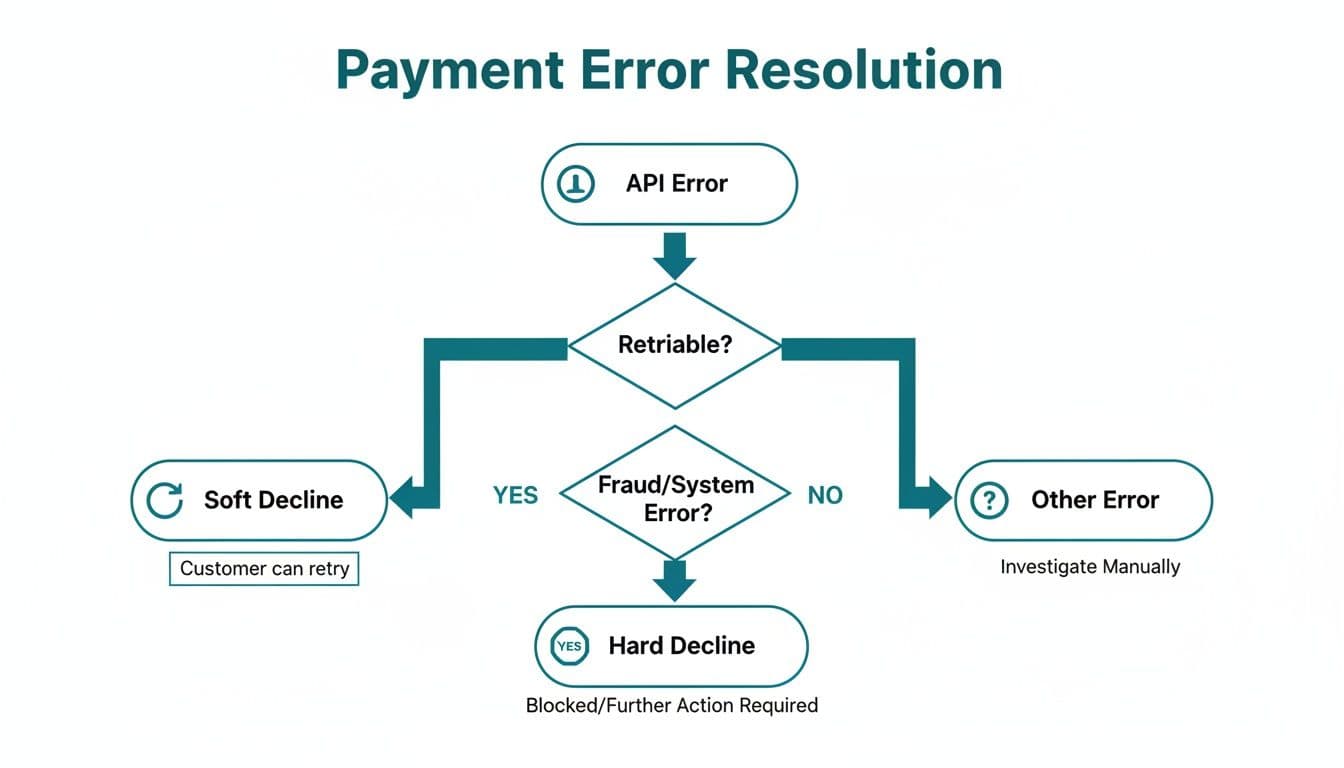
It's important to distinguish between a "soft" decline that might be temporary (and thus retriable) and a "hard" decline that's permanent. A visual flow like this can really help you map out your system's response logic.
Common Questions We Hear About API Integration#
When you're looking at a payment gateway integration, you're bound to have questions. It's a space where technical details meet critical business needs, and it's easy to get tangled up. A few straight answers to the questions we hear most often from developers and product owners. Hopefully, this will help you sidestep a few common hurdles and build with a bit more confidence.
What's the Real Difference Between a Payment Processor and a Payment Gateway?
It's really common for people to use these terms interchangeably, but they actually play two very different roles in getting you paid.
Think of the payment gateway as the digital version of a card reader in a shop. Its main job is to securely grab the customer's payment details, encrypt them, and pass them along. It's the front door, responsible for the initial, secure handshake.
The payment processor is the one doing the heavy lifting behind the scenes. Once the gateway hands off the encrypted data, the processor talks to the big card networks (like Visa or Mastercard) and coordinates with the customer's and your banks to actually move the money. While a lot of modern providers bundle these services together, knowing the difference is key when you're trying to figure out where a problem is coming from.
How Can I Test My Integration Without Spending Real Money?
This is probably one of the most critical parts of the whole process, and thankfully, any gateway worth its salt makes this easy. They'll give you access to a sandbox environment, which is basically a complete, self-contained clone of their live system. It lets you fire off real API calls and run through entire transaction flows without a single penny ever changing hands.
You'll get a list of special test card numbers that are designed to trigger specific results. For example, one number will always give you a successful payment, another will trigger an "insufficient funds" error, and you'll have others to simulate fraud warnings or lost/stolen card declines.
A Quick Word of Advice — The single most important thing you can do before going live is to test absolutely everything in the sandbox. I'm talking successful payments, every single decline code you can think of, refunds, and especially your webhook notifications. This kind of thorough testing is your best defence against nasty surprises once real customers are involved.
Do I Still Need to Care About PCI Compliance if I Use a Gateway?
Yes, you do, but the integration method you pick has a massive impact on how much you need to care. Your level of responsibility—what's known as your PCI scope—isn't set in stone. The smartest move you can make is to choose a solution where the gateway handles all the sensitive card data for you.
Here's a quick look at how different integration methods change your compliance headache:
- Hosted Payment Pages — This is the easiest path. Your customer gets sent to a page hosted entirely by the gateway to enter their details. Since the card data never even brushes past your servers, your PCI burden is minimal.
- Embedded Fields (iframes) — This is a great middle ground. The payment form looks and feels like it's part of your website, but the fields where the customer types their card number and CVC are actually secure little windows (iframes) hosted by the gateway. Again, the sensitive data stays off your systems.
- Direct API Integration — This route gives you total control over the user experience, but it also lands you with the heaviest compliance burden (SAQ D). You're handling raw card data on your own servers, which is a significant responsibility.
Always try to pick an integration strategy that keeps your PCI scope as small as possible. It will save you an incredible amount of time, money, and stress down the line.
What Are Webhooks, and Why Are They so Important?
Think of webhooks as automated alerts that a payment gateway sends to your server when something important happens. They are absolutely fundamental to a modern payment system because they deal with all the things that don't happen instantly in that initial request-and-response moment.
Imagine a world without webhooks. You'd have to constantly hammer the gateway's API, asking, "Has that bank transfer cleared yet?" or "Did that subscription payment go through?" It's hugely inefficient and just not reliable.
Instead, webhooks let the gateway proactively tell your system about key events—a payment has cleared, a recurring charge failed, or a customer has disputed a transaction. A solid webhook handler isn't just a nice feature; it's an essential piece of the puzzle for keeping your own records accurate and your business running smoothly.
What is a payment gateway API?
A payment gateway API is the programmatic interface a gateway exposes so your software can submit payments, manage tokens, refund transactions, and receive event notifications without a human in the loop. It's the bridge between your application — a website checkout, a mobile app, a CRM, or a contact-centre tool — and the gateway's payment processing infrastructure. You authenticate with an API key or OAuth token, post a JSON request describing the payment, and the gateway returns a transaction ID and a status. Webhooks then notify your application about asynchronous events like settled funds, recurring charges, or chargebacks.
Which payment gateway API is best for telephone payments?
There's no single "best" gateway API for telephone payments — it depends on which acquirer you use and how comfortable your team is taking on PCI scope. The decisive factor isn't the gateway itself; it's whether the integration keeps card data out of your contact centre. Most modern gateway APIs (Stripe, Worldpay, Adyen, NatWest, Lloyds Cardnet) work fine for phone payments when paired with a DTMF-masking layer that intercepts card details on the customer's keypad before they reach the agent or call recording. Without that layer, even the best gateway API leaves agents and recordings in PCI scope. If you're integrating phone payments now, choose a gateway that pairs cleanly with a PCI Level 1 capture provider.
If your integration involves phone, chat or agent-assisted payments and you want the PCI scope to stay small, get in touch — we'll walk through how Paytia sits alongside your existing gateway integration.
Integrate secure phone payments in hours, not weeks
Paytia's API plugs into Stripe, Worldpay, RyftPay, Lloyds Cardnet, and others. Two endpoints to take card payments by phone with full PCI scope reduction. Sandbox access on request.
Related reading#
- Pay by Link vs Hosted Checkout: Which to Use
- Manual vs Automated Payment Chasing: When to Switch
- How Open Banking Works: Essential Business Guide
- What is click to pay: A Faster, Safer Online Checkout
- What Is a Merchant Acquiring Bank?
- What is digital banking? A Clear Guide to Modern Finance
- Bank Reference Number: What It Is and How to Find It
- Direct Debit Payments: Complete UK Business Guide
- A Guide to Merchant Payment Processing and Costs
- A Business Guide to Pay by Bank in the UK
- Payment by Link: Secure and Simple Transactions
- The Benefits of Using Secure Payment Links
- Merchant Services Fees Explained for UK Businesses
- Variable Recurring Payments (VRP): Complete Guide
- How Cross-Channel Refunds Actually Work
- Verifone Integration Checklist for UK Retail
For the product side, see our Phone payment solutions solution.
Want to see this working in your setup? Book a working-demo call — we'll wire up your actual phone system and show you a live capture.